<?xml version="1.0" encoding="utf-8"?><feed xmlns="http://www.w3.org/2005/Atom" xml:lang="en"><generator uri="https://jekyllrb.com/" version="3.10.0">Jekyll</generator><link href="https://davidneurieder.github.io/feed.xml" rel="self" type="application/atom+xml" /><link href="https://davidneurieder.github.io/" rel="alternate" type="text/html" hreflang="en" /><updated>2026-08-14T12:45:46+00:00</updated><id>https://davidneurieder.github.io/feed.xml</id><title type="html">David Neurieder’s Blog</title><subtitle>Android development, privacy, open source, and offline-first architecture</subtitle><author><name>David Neurieder</name></author><entry><title type="html">Forgepost: A Self-Hosted Blog Engine That Runs Experiments on Its Own Content</title><link href="https://davidneurieder.github.io/2026/08/14/forgepost-self-hosted-block-experiments/" rel="alternate" type="text/html" title="Forgepost: A Self-Hosted Blog Engine That Runs Experiments on Its Own Content" /><published>2026-08-14T00:00:00+00:00</published><updated>2026-08-14T00:00:00+00:00</updated><id>https://davidneurieder.github.io/2026/08/14/forgepost-self-hosted-block-experiments</id><content type="html" xml:base="https://davidneurieder.github.io/2026/08/14/forgepost-self-hosted-block-experiments/"><![CDATA[<p>The big platforms shape your writing. Medium tells you which posts land. Substack tells you who finishes reading. A/B testing is how every serious growth team ships copy — but as a solo blogger you get none of that. Your analytics tool gives you pageviews; it doesn’t tell you whether the new headline actually beats the old one, and even if it did, you’d never own the data or the tooling behind it.</p>

<p>So I built <a href="https://github.com/DavidNeurieder/Forgepost">Forgepost</a>: a self-hosted blogging engine whose whole point is the <strong>publish → measure → experiment → improve</strong> loop. It’s a small blog that treats every headline, paragraph, image, and call-to-action as a measurable, testable object. You write in Markdown, publish, watch where readers drop off, then A/B test alternative content on a single block and let a Bayesian engine decide when a variant is a clear winner. Version <strong>0.1.0</strong> just shipped.</p>

<h2 id="a-blog-you-can-test">A blog you can test</h2>

<p>At its heart Forgepost is a tiny blogging engine. A Markdown editor parses your post into an immutable block tree — <code class="language-plaintext highlighter-rouge">heading</code>, <code class="language-plaintext highlighter-rouge">paragraph</code>, <code class="language-plaintext highlighter-rouge">image</code>, <code class="language-plaintext highlighter-rouge">quote</code>, <code class="language-plaintext highlighter-rouge">code</code>, <code class="language-plaintext highlighter-rouge">call_to_action</code>, <code class="language-plaintext highlighter-rouge">divider</code>. Each block is a versioned object, and that’s what makes experimentation possible: an experiment is just “show some visitors a different version of one block.”</p>

<p>Saving sets the public URL from the title while the post is still a draft; once published, the URL is stable. Publish and the post appears on the public route and the RSS feed. That part is deliberately boring — the interesting stuff happens after you publish.</p>

<h2 id="measuring-without-creeping">Measuring without creeping</h2>

<p>Analytics on the web has a habit of being invasive. Forgepost takes the opposite approach: the tracking script reports <strong>banded scroll depth</strong> (25, 50, 75, 100%), article completion, read time, and per-block impressions through a rate-limited API. No raw scroll streams, no personal data, no third-party cookies — just enough to rebuild the reading experience afterwards.</p>

<p>From that you get per-article stats (views, unique readers, average reading time, completion, a scroll-depth funnel) and a per-block drop-off table: <em>this is exactly where readers leave.</em> Every estimated number is labeled as estimated, because ad blockers and JS-disabled readers are undercounted by design. A recent wave added <strong>traffic sources</strong> (Search / Direct / Community per article), <strong>share tracking</strong> (a Share button that reports click events), and <strong>“Keep reading”</strong> — up to three related-post cards ranked by shared tags, with impressions and clicks tracked for a future recommendation engine.</p>

<h2 id="the-bayesian-engine">The Bayesian engine</h2>

<p>The interesting technical core is <code class="language-plaintext highlighter-rouge">forgepost-experiments</code>, a pure Rust crate with no I/O. When you A/B test a block, each variant gets a stable per-visitor share of traffic, and the engine tracks impressions and conversions. The goal model is deliberately single: a “completion” is a visitor who scrolled to the end of the article.</p>

<p>Under the hood it’s a Bayesian sequential test with exact <code class="language-plaintext highlighter-rouge">P(beats control)</code> from beta posteriors, equal-tailed credible intervals, and a confidence threshold that’s corrected for spending — so peeking at the results a thousand times doesn’t fool the threshold the way naive repeated significance testing would. There’s also a no-winner stopping rule: when a variant is near-certain to lose, the test concludes “no improvement” instead of waiting forever.</p>

<p>A background auto-decider polls running experiments and applies the rules automatically — promoting the winning variant once it clears the threshold, or concluding no improvement. A decision repoints the live block to the winning immutable version, so the article updates immediately. The correctness story is solid: golden tests with hand-computed beta probabilities plus property tests for posterior sanity, sample-size concentration, and assignment honesty.</p>

<h2 id="one-binary-one-command">One binary, one command</h2>

<p>Forgepost is a single Rust binary with an embedded SQLite database. There is no Node.js server in production, no separate database server, no reverse proxy required — the binary terminates HTTPS itself, either with certificates you bring or with automatic Let’s Encrypt issuance and renewal via TLS-ALPN-01 (no port 80 needed for issuance). Deployment is one command:</p>

<div class="language-sh highlighter-rouge"><div class="highlight"><pre class="highlight"><code><span class="nb">sudo</span> ./install.sh blog.example.com
</code></pre></div></div>

<p>That script installs build deps and Rust, clones and builds the release binary, creates a locked-down runtime user, writes the config, installs systemd units, and opens the firewall. A nightly backup service runs <code class="language-plaintext highlighter-rouge">forgepost export</code> — a JSON dump of the whole database, experiments and decisions included — alongside a tarball of your uploaded media, pruned by retention. For the release I also added deploy tests that boot the binary from the install script’s own env-file keys and run the real backup script against a throwaway database, plus a check that the scripts still point at the real repository — the kind of thing that breaks silently and wakes you up at 3 a.m.</p>

<h2 id="what-id-tell-myself">What I’d tell myself</h2>

<ul>
  <li><strong>A single goal model is a feature.</strong> One “what did the reader do at the end?” measure keeps the experiment engine simple and the dashboard honest. Custom goals can come later; the MVP is better for not having them.</li>
  <li><strong>Honest labels beat clever algorithms.</strong> Admitting that blockers make numbers an underestimate is what makes the rest of the product trustworthy.</li>
  <li><strong>Self-hosting is the whole brand.</strong> No telemetry, no signup to read, no third-party anything. The data is a SQLite file you can back up with <code class="language-plaintext highlighter-rouge">forgepost export</code> and delete whenever you like.</li>
</ul>

<p>Forgepost is AGPL-3.0. The single binary is attached to the <a href="https://github.com/DavidNeurieder/Forgepost/releases/tag/v0.1.0">v0.1.0 release</a>, and the docs site walks through install, setup, and the experiment workflow. If you’ve ever wanted your own writing to get the treatment the big platforms reserve for their paying customers, give it a shot.</p>

<p>Source: <a href="https://github.com/DavidNeurieder/Forgepost">github.com/DavidNeurieder/Forgepost</a> (AGPL-3.0)</p>]]></content><author><name>David Neurieder</name></author><category term="opensource" /><category term="opensource" /><category term="rust" /><category term="self-hosting" /><category term="blogging" /><category term="bayesian" /><category term="sqlite" /><category term="axum" /><category term="agpl" /><summary type="html"><![CDATA[Forgepost is a self-hosted blogging engine built around publish → measure → experiment → improve. Every headline, paragraph, image, and call-to-action is a testable block, and a Bayesian engine decides when a variant wins.]]></summary><media:thumbnail xmlns:media="http://search.yahoo.com/mrss/" url="https://davidneurieder.github.io/assets/images/posts/forgepost.svg" /><media:content medium="image" url="https://davidneurieder.github.io/assets/images/posts/forgepost.svg" xmlns:media="http://search.yahoo.com/mrss/" /></entry><entry><title type="html">LibreCrate: The Encrypted Document Vault That Runs Everywhere</title><link href="https://davidneurieder.github.io/2026/08/11/librecrate-encrypted-document-vault/" rel="alternate" type="text/html" title="LibreCrate: The Encrypted Document Vault That Runs Everywhere" /><published>2026-08-11T00:00:00+00:00</published><updated>2026-08-11T00:00:00+00:00</updated><id>https://davidneurieder.github.io/2026/08/11/librecrate-encrypted-document-vault</id><content type="html" xml:base="https://davidneurieder.github.io/2026/08/11/librecrate-encrypted-document-vault/"><![CDATA[<p>A few months ago I found myself with the same problem in two places at once. On my phone I had PDFs, receipts, and comics scattered across apps and download folders. On my laptop I had the same kinds of files in a different mess. And the stuff I actually cared about — medical records, boarding passes, personal notes — I didn’t really want sitting in a folder that any other app could read.</p>

<p>So I built <a href="https://github.com/DavidNeurieder/LibreCrate">LibreCrate</a>: an encrypted document vault that runs on <strong>Android, Linux, macOS, and Windows</strong>, with a core written once in Rust. It stores PDFs, EPUBs, Apple Wallet passes, CBZ comics, images, and Markdown notes. Every file is encrypted at rest, the app has zero network access, and your data moves between devices through encrypted backups — never through a cloud.</p>

<h2 id="one-rust-core-three-frontends">One Rust core, three frontends</h2>

<p>The decision that shaped the whole project: instead of writing the crypto, database, and backup logic once per platform, everything lives in a single Rust crate called <code class="language-plaintext highlighter-rouge">vault-native</code>. Three frontends talk to it:</p>

<ul>
  <li><strong>Android</strong> — Kotlin + Jetpack Compose, bridged through Mozilla’s <a href="https://mozilla.github.io/uniffi-rs/">UniFFI</a>. The Gradle build compiles the Rust library and generates the Kotlin bindings automatically; the app never touches a byte of crypto directly.</li>
  <li><strong>Desktop GUI</strong> — <a href="https://iced.rs/">Iced</a>, a native Rust GUI framework. The same vault, library, readers, and settings on Linux, macOS, and Windows.</li>
  <li><strong>CLI</strong> — a small terminal app with an interactive REPL: <code class="language-plaintext highlighter-rouge">init</code>, <code class="language-plaintext highlighter-rouge">import</code>, <code class="language-plaintext highlighter-rouge">list</code>, <code class="language-plaintext highlighter-rouge">search</code>, <code class="language-plaintext highlighter-rouge">backup</code>, <code class="language-plaintext highlighter-rouge">restore</code>, plus readline history and tab completion.</li>
</ul>

<p>One codebase handles encryption, the SQLCipher database, merging, and backup. Fix a bug in the core and every platform gets the fix. The UI layers only ever see a clean FFI surface.</p>

<h2 id="encryption-at-rest">Encryption at rest</h2>

<ul>
  <li><strong>Per-file encryption</strong> — AES-256-GCM with a 12-byte IV and 128-bit tag</li>
  <li><strong>Key wrapping</strong> — the master key is wrapped via Argon2id + AES-256 Key Wrap (RFC 3394)</li>
  <li><strong>Optional password mode</strong> — even with the device unlocked, nothing is readable without the password; otherwise the master key is wrapped with a per-device key</li>
  <li><strong>Zero network</strong> — there is no internet permission in the manifest. Not “we promise not to phone home” — the app literally cannot.</li>
</ul>

<h2 id="a-library-you-can-actually-search">A library you can actually search</h2>

<p>The vault remembers your reading position per document — last page for PDFs and comics, last location for EPUBs — and shows “Page X of Y” right on the library cards. Filtering by type, favorites, and sort order round out the library view.</p>

<p>The killer feature for me is full-text search. FTS5 indexes title, author, description, <em>and</em> the extracted text inside each document, with highlighted snippets in the results. I can search all my PDFs for a phrase I half-remember and get the matching document with the surrounding text highlighted. It feels like owning my own little search engine — no cloud, no telemetry.</p>

<h2 id="backups-that-merge">Backups that merge</h2>

<p>Backups are a single encrypted <code class="language-plaintext highlighter-rouge">.librecrate-backup</code> file containing the wrapped master key, the database, and every document. Because the format is shared between Android and desktop, a backup made on your phone restores on your laptop and vice versa.</p>

<p>The newest behavior (0.5.4) is that <strong>import merges instead of replacing</strong>. In the past, importing a backup rebuilt your library from scratch — anything local that wasn’t in the backup was gone. Now the backup’s documents are added on top of your existing library: your documents stay, the backup’s content joins them, and conflicting versions are flagged instead of silently overwritten. Your local passkey stays exactly as it is — only the backup’s own passkey is needed to decrypt it, and backups created with a <em>different</em> passkey can be merged too (their files are re-encrypted with your local key). Merged documents are searchable immediately.</p>

<h2 id="chasing-reproducible-f-droid-builds">Chasing reproducible F-Droid builds</h2>

<p>LibreCrate is F-Droid-only by design — no Play Services, no Firebase, no Crashlytics. That means the <a href="https://f-droid.org/">F-Droid build farm</a> compiles the native Rust library itself, and it requires the resulting APK to match mine <strong>byte-for-byte</strong>. This has been the most humbling part of the project.</p>

<p>The native library builds MuPDF from source, which initially produced subtly different binaries on different machines. The fixes were a real scavenger hunt: deterministic source ordering in the MuPDF C wrapper, <code class="language-plaintext highlighter-rouge">--remap-path-prefix</code> to strip every local build path from the binary, a pinned Rust toolchain, an OpenSSL <code class="language-plaintext highlighter-rouge">ranlib</code> fix for the NDK, and most recently gating MuPDF’s system-font support behind a desktop-only feature so the F-Droid host build no longer needs system <code class="language-plaintext highlighter-rouge">fontconfig</code>. Each fix is one more variable eliminated, and the local build now matches F-Droid’s — apart from the git revision F-Droid embeds, which is expected.</p>

<p>The recipe is ready; the build farm just keeps finding new ways to break my weekend. That’s the F-Droid way, and honestly I’d rather have it than trust a binary blob I didn’t build.</p>

<h2 id="try-it">Try it</h2>

<p>If you’ve ever wanted your documents to live only on your devices — readable, searchable, and encrypted — give it a shot.</p>

<ul>
  <li><strong>Android</strong>: install the APK from the <a href="https://github.com/DavidNeurieder/LibreCrate/releases">GitHub releases</a></li>
  <li><strong>Desktop</strong>: prebuilt binaries for Linux/macOS/Windows, or <code class="language-plaintext highlighter-rouge">cargo install --path vault-native/gui</code></li>
  <li><strong>CLI</strong>: <code class="language-plaintext highlighter-rouge">cargo install --path vault-native/cli</code></li>
</ul>

<p>Source: <a href="https://github.com/DavidNeurieder/LibreCrate">github.com/DavidNeurieder/LibreCrate</a> (AGPL-3.0)</p>]]></content><author><name>David Neurieder</name></author><category term="librecrate" /><category term="android" /><category term="opensource" /><category term="privacy" /><category term="librecrate" /><category term="android" /><category term="opensource" /><category term="privacy" /><category term="rust" /><category term="encryption" /><category term="offline" /><category term="uniffi" /><category term="iced" /><summary type="html"><![CDATA[LibreCrate is my encrypted, offline-first document vault for Android, Linux, macOS, and Windows — one Rust core powering three frontends, with full-text search and cross-platform merge backups.]]></summary><media:thumbnail xmlns:media="http://search.yahoo.com/mrss/" url="https://davidneurieder.github.io/assets/images/posts/librecrate.svg" /><media:content medium="image" url="https://davidneurieder.github.io/assets/images/posts/librecrate.svg" xmlns:media="http://search.yahoo.com/mrss/" /></entry><entry><title type="html">Fixing exports, adding statistics, and closing the testing gap</title><link href="https://davidneurieder.github.io/2026/07/23/fixing-exports-and-adding-statistics-to-activity-trace/" rel="alternate" type="text/html" title="Fixing exports, adding statistics, and closing the testing gap" /><published>2026-07-23T00:00:00+00:00</published><updated>2026-07-23T00:00:00+00:00</updated><id>https://davidneurieder.github.io/2026/07/23/fixing-exports-and-adding-statistics-to-activity-trace</id><content type="html" xml:base="https://davidneurieder.github.io/2026/07/23/fixing-exports-and-adding-statistics-to-activity-trace/"><![CDATA[<p>The export returned <code class="language-plaintext highlighter-rouge">true</code>. The app showed “Export complete.” But the file didn’t exist.</p>

<p>That’s worse than a crash. A crash is loud — you know something broke. A silent success that does nothing leaves users thinking the feature works while they have nothing to show for it.</p>

<p>I found three of these bugs in Activity Trace. Here’s how I fixed them, plus the statistics screen rewrite and database migration that came along for the ride.</p>

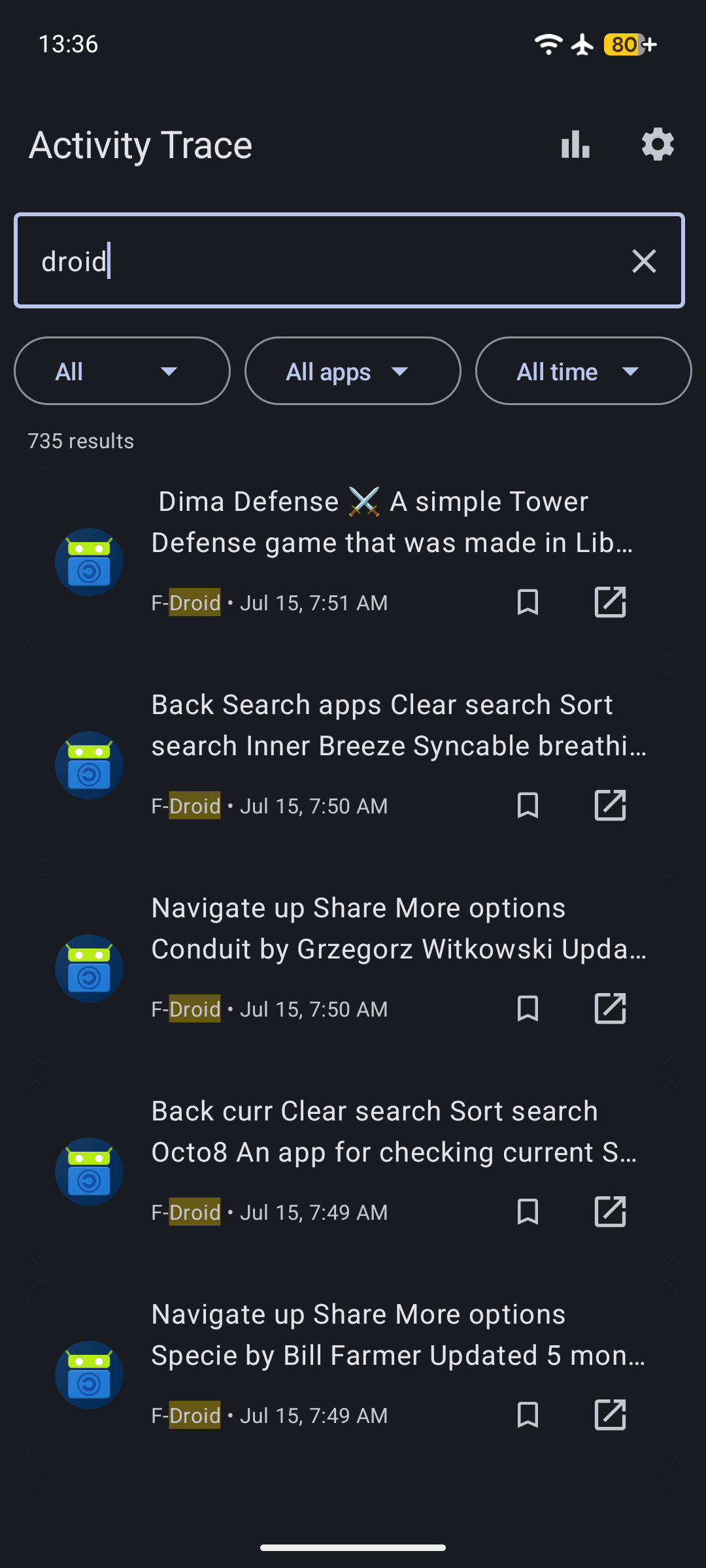
<p><img src="/assets/images/posts/activity-trace/1.png" width="180" alt="Activity Trace search screen" /></p>

<h2 id="how-exports-were-silently-failing">How exports were silently failing</h2>

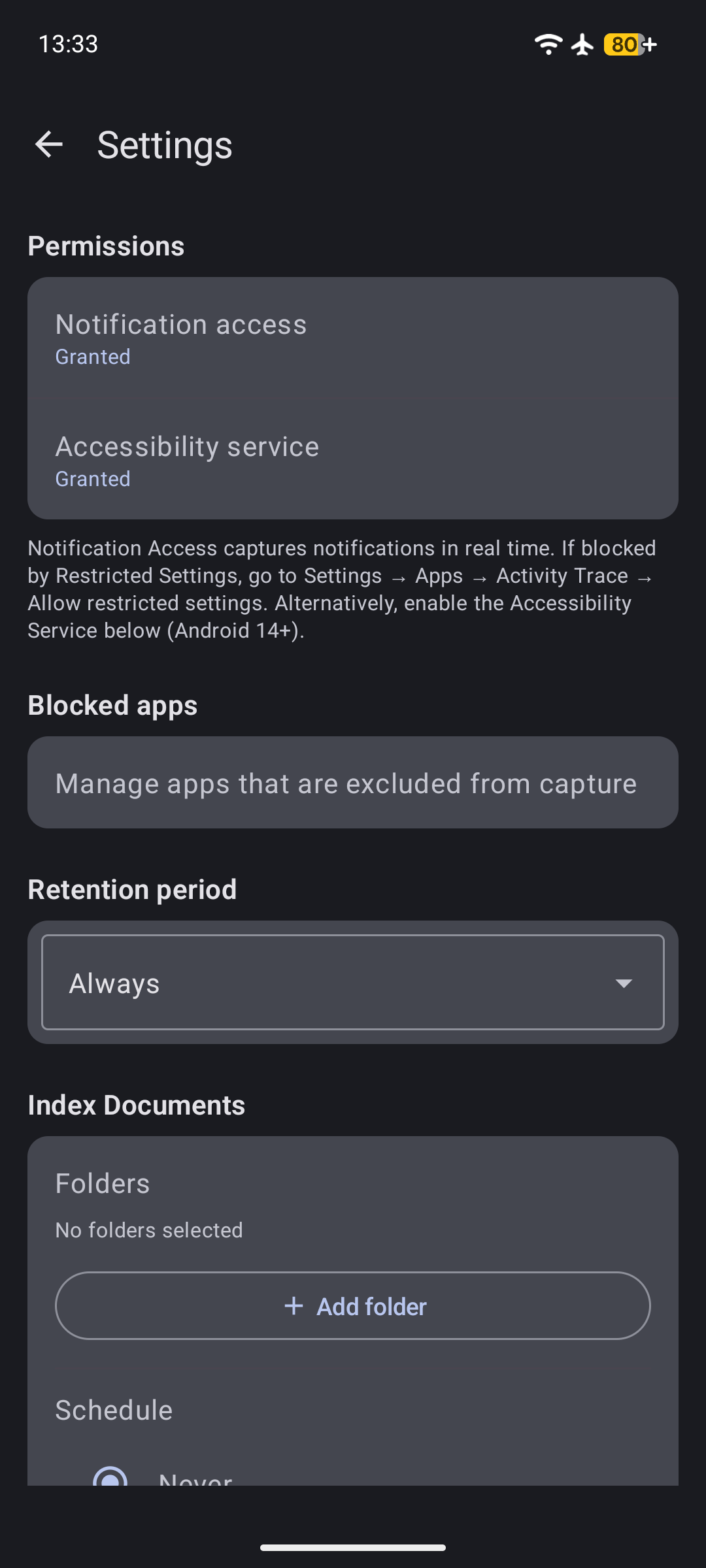
<p>Activity Trace lets you export captured clipboard content as JSON, CSV, or a plain SQLite database. The code used <code class="language-plaintext highlighter-rouge">Boolean</code> as the return type — <code class="language-plaintext highlighter-rouge">true</code> for success, <code class="language-plaintext highlighter-rouge">false</code> for failure. Simple.</p>

<p>But the gap between “the function returned” and “the file exists” was wide enough to drive a truck through.</p>

<p><img src="/assets/images/posts/activity-trace/3.png" width="180" alt="Settings screen with export options" /></p>

<h3 id="bug-1-null-output-stream">Bug 1: Null output stream</h3>

<p><code class="language-plaintext highlighter-rouge">MediaStore</code> on API 29+ works by inserting a content URI, then opening an output stream on it. If <code class="language-plaintext highlighter-rouge">openOutputStream</code> returns null — which happens when another app has a lock on the file or the content resolver rejects the URI — the old code just returned <code class="language-plaintext highlighter-rouge">false</code> without writing anything. But the calling code checked <code class="language-plaintext highlighter-rouge">if (!writeToDownloads(...))</code> and threw if false. If <code class="language-plaintext highlighter-rouge">openOutputStream</code> returned null, <code class="language-plaintext highlighter-rouge">writeContent</code> got a null stream, returned <code class="language-plaintext highlighter-rouge">false</code>, and the caller threw. So this <em>was</em> caught — but only on the code path that checked the return value.</p>

<p>The real problem was the <strong>database export path</strong>. It didn’t check the return value at all. It used the same pattern but ignored the result, making it a silent no-op.</p>

<h3 id="bug-2-stale-temp-files">Bug 2: Stale temp files</h3>

<p><code class="language-plaintext highlighter-rouge">DatabaseExporter.exportToPlainSqlite</code> creates a temporary SQLite file, attaches it to the encrypted Room database, and runs <code class="language-plaintext highlighter-rouge">sqlcipher_export</code> to copy data into it. If a previous export crashed, the temp file survived with its schema intact. The next run would try to <code class="language-plaintext highlighter-rouge">ATTACH DATABASE</code> to the existing file, find it already has a <code class="language-plaintext highlighter-rouge">captured_items</code> table, and fail with <strong>“table captured_items already exists”</strong>.</p>

<p>The fix was a single line: <code class="language-plaintext highlighter-rouge">outputFile.delete()</code> before opening the new database. Plus a <code class="language-plaintext highlighter-rouge">finally</code> block to clean up after ourselves.</p>

<h3 id="bug-3-no-diagnostic-logging">Bug 3: No diagnostic logging</h3>

<p>When the export <em>did</em> fail, the user saw “Export failed” with no way to figure out why. I added <code class="language-plaintext highlighter-rouge">ExportErrorLogger</code> — a utility that writes the full stack trace to <code class="language-plaintext highlighter-rouge">Download/ActivityTrace/export_error_&lt;timestamp&gt;.log</code> using MediaStore (API 29+) or the legacy file API, with a fallback chain all the way down to <code class="language-plaintext highlighter-rouge">filesDir/ActivityTrace/</code>.</p>

<p>Along with that I replaced the <code class="language-plaintext highlighter-rouge">Boolean</code> return type with a sealed class:</p>

<div class="language-kotlin highlighter-rouge"><div class="highlight"><pre class="highlight"><code><span class="k">sealed</span> <span class="kd">class</span> <span class="nc">ExportStatus</span> <span class="p">{</span>
    <span class="kd">data class</span> <span class="nc">Success</span><span class="p">(</span><span class="kd">val</span> <span class="py">message</span><span class="p">:</span> <span class="nc">String</span><span class="p">)</span> <span class="p">:</span> <span class="nc">ExportStatus</span><span class="p">()</span>
    <span class="kd">data class</span> <span class="nc">Error</span><span class="p">(</span><span class="kd">val</span> <span class="py">message</span><span class="p">:</span> <span class="nc">String</span><span class="p">)</span> <span class="p">:</span> <span class="nc">ExportStatus</span><span class="p">()</span>
    <span class="kd">data class</span> <span class="nc">Progress</span><span class="p">(</span><span class="kd">val</span> <span class="py">message</span><span class="p">:</span> <span class="nc">String</span><span class="p">)</span> <span class="p">:</span> <span class="nc">ExportStatus</span><span class="p">()</span>
    <span class="kd">data class</span> <span class="nc">Cancelled</span><span class="p">(</span><span class="kd">val</span> <span class="py">message</span><span class="p">:</span> <span class="nc">String</span> <span class="p">=</span> <span class="s">""</span><span class="p">)</span> <span class="p">:</span> <span class="nc">ExportStatus</span><span class="p">()</span>
<span class="p">}</span>
</code></pre></div></div>

<p>Now every caller must handle all four cases. No more “returned true but did nothing.”</p>

<h2 id="database-migration-for-system-app-blocking">Database migration for system app blocking</h2>

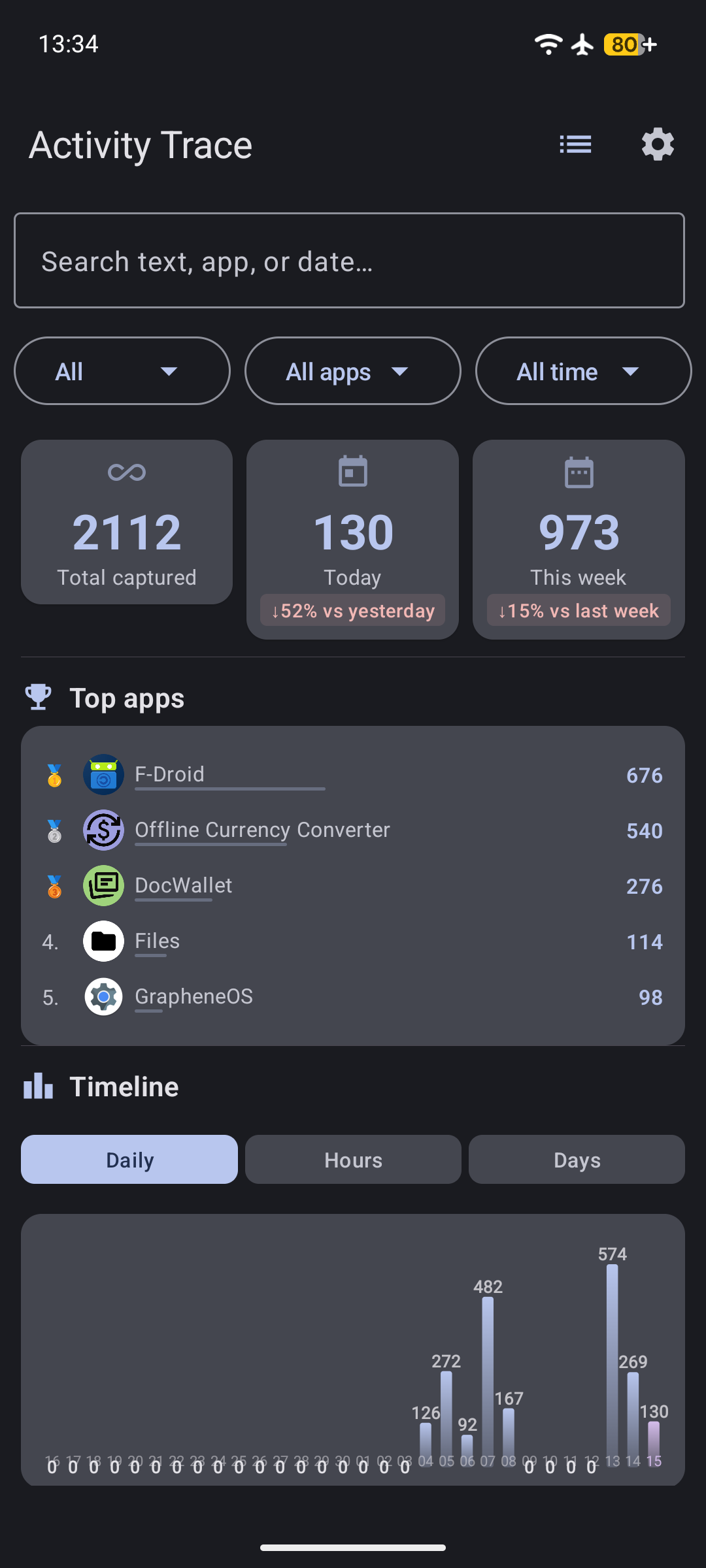
<p><img src="/assets/images/posts/activity-trace/4.png" width="180" alt="System app blocking screen" /></p>

<p>Activity Trace lets you block certain apps from being captured. By default, system apps like the keyboard, launcher, and settings should be blocked so they don’t clutter your history.</p>

<p>The list lived in <code class="language-plaintext highlighter-rouge">CaptureIngestor.kt</code> as <code class="language-plaintext highlighter-rouge">DEFAULT_BLOCKED</code>. But when the database needed to seed these defaults on first run, it created a <strong>circular dependency</strong> — the database module shouldn’t know about the capture module.</p>

<p>I extracted the constant to a standalone file:</p>

<div class="language-kotlin highlighter-rouge"><div class="highlight"><pre class="highlight"><code><span class="c1">// BlockedAppDefaults.kt</span>
<span class="k">internal</span> <span class="kd">val</span> <span class="py">DEFAULT_BLOCKED</span> <span class="p">=</span> <span class="nf">setOf</span><span class="p">(</span>
    <span class="s">"com.android.inputmethod.latin"</span><span class="p">,</span>
    <span class="s">"com.android.systemui"</span><span class="p">,</span>
    <span class="s">"com.google.android.apps.nexuslauncher"</span><span class="p">,</span>
    <span class="c1">// ... 4 more</span>
<span class="p">)</span>
</code></pre></div></div>

<p>Then bumped the database version to 6 and wrote a migration. Here’s where it got tricky.</p>

<p>Room migrations with SQLCipher run through <code class="language-plaintext highlighter-rouge">SupportSQLiteDatabase</code>, which is a wrapper around the encrypted database. The <code class="language-plaintext highlighter-rouge">execSQL</code> method <strong>does not support <code class="language-plaintext highlighter-rouge">?</code> bind arguments</strong>. I spent an hour wondering why <code class="language-plaintext highlighter-rouge">execSQL("INSERT INTO blocked_apps(app_package) VALUES(?)", arrayOf("com.android.inputmethod.latin"))</code> wasn’t working. It just silently inserted nothing.</p>

<p>The fix: inline the values as string interpolation. Ugly, but it works:</p>

<div class="language-kotlin highlighter-rouge"><div class="highlight"><pre class="highlight"><code><span class="k">fun</span> <span class="nf">seedDefaultBlocked</span><span class="p">(</span><span class="n">db</span><span class="p">:</span> <span class="nc">SupportSQLiteDatabase</span><span class="p">)</span> <span class="p">{</span>
    <span class="k">for</span> <span class="p">(</span><span class="n">pkg</span> <span class="k">in</span> <span class="nc">DEFAULT_BLOCKED</span><span class="p">)</span> <span class="p">{</span>
        <span class="n">db</span><span class="p">.</span><span class="nf">execSQL</span><span class="p">(</span><span class="s">"INSERT OR IGNORE INTO blocked_apps(app_package) VALUES('$pkg')"</span><span class="p">)</span>
    <span class="p">}</span>
<span class="p">}</span>
</code></pre></div></div>

<p>The migration and the <code class="language-plaintext highlighter-rouge">RoomDatabase.Callback.onCreate</code> both call the same function, so fresh installs and upgrades behave the same way.</p>

<h2 id="unifying-the-statistics-screen">Unifying the statistics screen</h2>

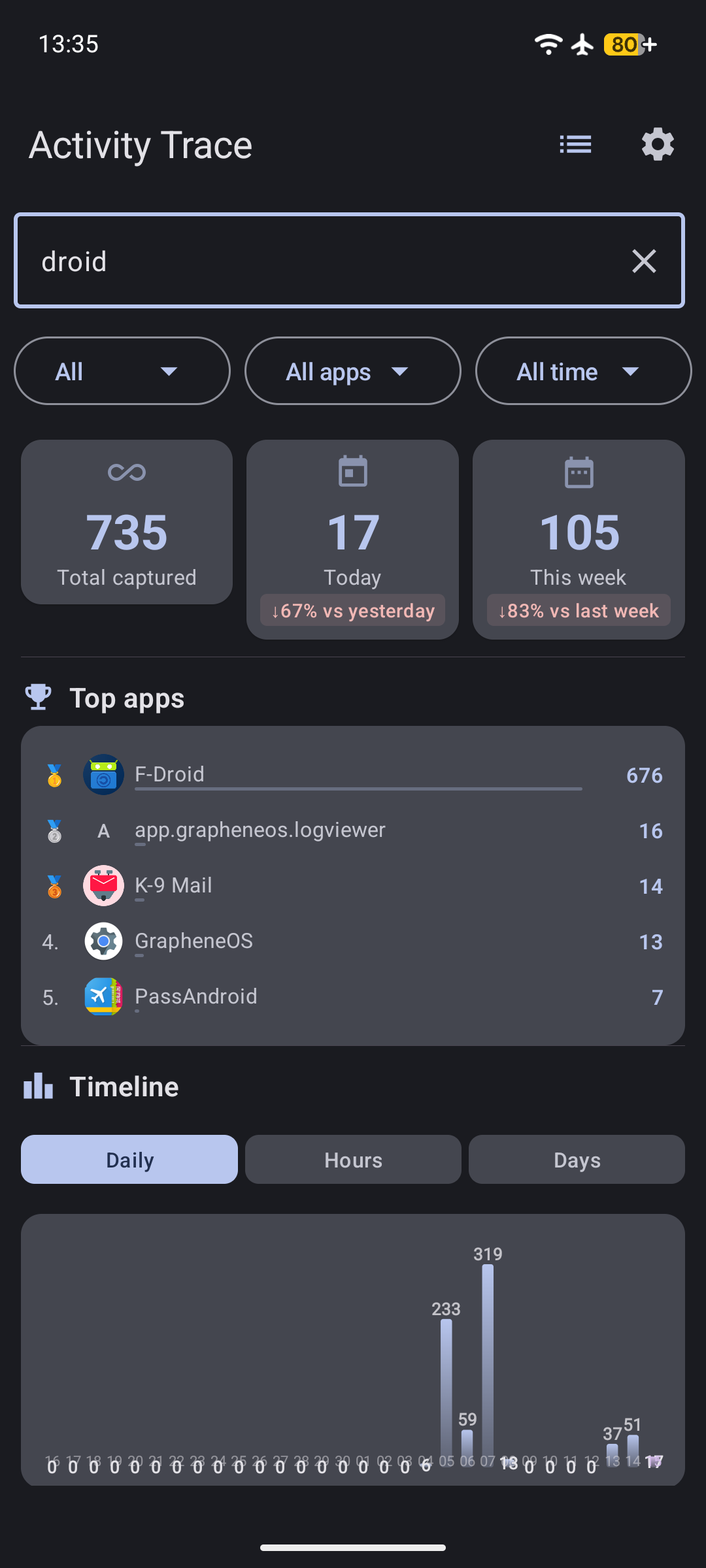
<p><img src="/assets/images/posts/activity-trace/2.png" width="180" alt="Statistics screen" /></p>

<p>The statistics screen had two layouts depending on whether you selected a single app or viewed all apps. If you selected one app, it showed a different set of charts below the summary cards. Switching between tabs would change the chart height, causing a <strong>visual jump</strong> as content shifted around.</p>

<p>I removed the conditional layout entirely. Now every view shows:</p>

<p><strong>SummaryCards → Top apps → Timeline → Content type breakdown</strong></p>

<p>No matter what filter you apply, the structure stays the same. The charts all use a <strong>unified 160dp height</strong>, so switching between the Daily, Hourly, and Day-of-week tabs doesn’t move anything.</p>

<p>While I was in there, I fixed an overlapping label issue in <code class="language-plaintext highlighter-rouge">DailyChart</code>. When a bar is short (fewer than 32 pixels), the count label drew on top of the date label below it. The fix: draw the count label <strong>inside the bar</strong> when the bar height is too small — otherwise it switches to the default position above the bar.</p>

<div class="language-kotlin highlighter-rouge"><div class="highlight"><pre class="highlight"><code><span class="kd">val</span> <span class="py">textY</span> <span class="p">=</span> <span class="k">if</span> <span class="p">(</span><span class="n">barHeight</span> <span class="p">&lt;=</span> <span class="mf">32f</span><span class="p">)</span> <span class="n">barTop</span> <span class="p">+</span> <span class="n">barHeight</span> <span class="p">-</span> <span class="mf">4f</span> <span class="k">else</span> <span class="n">barTop</span> <span class="p">-</span> <span class="mf">8f</span>
</code></pre></div></div>

<h2 id="tests-that-caught-real-bugs">Tests that caught real bugs</h2>

<p>The export bugs were all in untested code paths. I added <strong>14 new tests across 5 test files</strong> to cover them:</p>

<ul>
  <li><strong>BlockedAppDefaultsTest</strong> — Verify all 7 default packages are present</li>
  <li><strong>ExportStatusTest</strong> — Exhaustive <code class="language-plaintext highlighter-rouge">when</code> coverage on the sealed class</li>
  <li><strong>ExportErrorLoggerTest</strong> — Log file content, cause chain, null message handling</li>
  <li><strong>DatabaseExporterTest</strong> — Query failure, execSQL failure, stale file replacement</li>
  <li><strong>ActivityTraceDatabaseMigrationTest</strong> — MIGRATION_5_6 seeds 7 packages without duplicates</li>
</ul>

<p>Plus a Compose UI smoke test for the statistics screen (5 instrumented tests) and an extended SettingsScreenTest that runs a full CSV→SQLite import roundtrip.</p>

<p>The roundtrip test immediately caught a bug I would have shipped: the CSV export used <strong><code class="language-plaintext highlighter-rouge">"text/csv; charset=utf-8"</code></strong> as the MIME type. MediaStore on Android 16 (API 36) rejects MIME types with RFC parameters. The insert returned null, the export failed, and the test turned red. Fixed by changing it to plain <code class="language-plaintext highlighter-rouge">"text/csv"</code>.</p>

<h2 id="the-takeaway">The takeaway</h2>

<p>Three things I’ll do differently going forward:</p>

<ol>
  <li>
    <p><strong>Never use <code class="language-plaintext highlighter-rouge">Boolean</code> as a return type for I/O operations.</strong> A sealed class with descriptive variants forces callers to handle failure, and gives users a meaningful error message when something breaks.</p>
  </li>
  <li>
    <p><strong>Always clean up temp files.</strong> If your function creates a file, delete it when you’re done — and delete it <em>before</em> you start if it already exists. Stale state from a previous run is a debugging nightmare.</p>
  </li>
  <li>
    <p><strong>Test the unhappy paths.</strong> The export code had been in production for months. Every code path that succeeded was tested by — well, succeeding. Every code path that failed was invisible. Write a test that makes the database throw, makes the output stream return null, makes the temp file already exist. Those tests are worth more than ten “insert item then read it back” tests.</p>
  </li>
</ol>

<p>The app is on F-Droid. If you want to try it, grab the latest build. All the fixes from this session are in v0.8.0.</p>

<p>Source: <a href="https://github.com/DavidNeurieder/ActivityTrace">github.com/DavidNeurieder/ActivityTrace</a></p>]]></content><author><name>David Neurieder</name></author><category term="android" /><category term="opensource" /><category term="testing" /><category term="activity-trace" /><category term="android" /><category term="open-source" /><category term="testing" /><category term="compose" /><category term="fdroid" /><category term="activity-trace" /><category term="sqlcipher" /><summary type="html"><![CDATA[What started as a bug hunt for silent export failures turned into a statistics screen overhaul, system app blocking, and 44 new tests for Activity Trace.]]></summary><media:thumbnail xmlns:media="http://search.yahoo.com/mrss/" url="https://davidneurieder.github.io/assets/images/posts/activity-trace-stats.svg" /><media:content medium="image" url="https://davidneurieder.github.io/assets/images/posts/activity-trace-stats.svg" xmlns:media="http://search.yahoo.com/mrss/" /></entry><entry><title type="html">How to Test Your Android Apps</title><link href="https://davidneurieder.github.io/2026/07/16/how-i-test-my-android-apps/" rel="alternate" type="text/html" title="How to Test Your Android Apps" /><published>2026-07-16T00:00:00+00:00</published><updated>2026-07-16T00:00:00+00:00</updated><id>https://davidneurieder.github.io/2026/07/16/how-i-test-my-android-apps</id><content type="html" xml:base="https://davidneurieder.github.io/2026/07/16/how-i-test-my-android-apps/"><![CDATA[<p>Testing Android apps is tedious. You write a function, then you write code to verify the function works, then you run it on a device to make sure the code that verifies the function also works. It’s turtles all the way down.</p>

<p>But the alternative is shipping bugs to users. So here’s how to actually do it — practical, no theory, just the steps.</p>

<h2 id="three-layers-of-testing">Three layers of testing</h2>

<p>You need three things:</p>

<ol>
  <li><strong>Unit tests</strong> — Fast, run on your machine, test logic in isolation</li>
  <li><strong>Instrumented tests</strong> — Run on a device or emulator, test UI and Android-specific code</li>
  <li><strong>Lint and type checks</strong> — Catch obvious mistakes before they become tests</li>
</ol>

<p>Each layer catches different bugs. Skip one and you’ll ship the kind of bugs that only show up on certain devices, or only after a specific sequence of user actions.</p>

<h2 id="layer-1-unit-tests">Layer 1: Unit tests</h2>

<p>Unit tests verify that a function does what it says. No Android framework, no database, no network. Just input in, output out.</p>

<h3 id="setting-up">Setting up</h3>

<p>In your <code class="language-plaintext highlighter-rouge">app/build.gradle.kts</code>, make sure you have test dependencies:</p>

<div class="language-kotlin highlighter-rouge"><div class="highlight"><pre class="highlight"><code><span class="nf">dependencies</span> <span class="p">{</span>
    <span class="nf">testImplementation</span><span class="p">(</span><span class="s">"junit:junit:4.13.2"</span><span class="p">)</span>
    <span class="nf">testImplementation</span><span class="p">(</span><span class="s">"org.assertj:assertj-core:3.24.2"</span><span class="p">)</span>
    <span class="nf">testImplementation</span><span class="p">(</span><span class="s">"org.mockito.kotlin:mockito-kotlin:5.1.0"</span><span class="p">)</span>
    <span class="nf">testImplementation</span><span class="p">(</span><span class="s">"org.jetbrains.kotlinx:kotlinx-coroutines-test:1.7.3"</span><span class="p">)</span>
<span class="p">}</span>
</code></pre></div></div>

<h3 id="writing-a-test">Writing a test</h3>

<p>Pick a function that does something meaningful. If you’re building a currency converter, test the conversion math. If you’re building a search engine, test the query parser.</p>

<p>Here’s a concrete example — testing cross-rate computation:</p>

<div class="language-kotlin highlighter-rouge"><div class="highlight"><pre class="highlight"><code><span class="kd">class</span> <span class="nc">ConversionCalculatorTest</span> <span class="p">{</span>

    <span class="nd">@Test</span>
    <span class="k">fun</span> <span class="nf">`cross</span> <span class="n">rate</span> <span class="n">from</span> <span class="n">non-EUR</span> <span class="n">source</span> <span class="n">computes</span> <span class="nf">correctly`</span><span class="p">()</span> <span class="p">{</span>
        <span class="c1">// Given: EUR→USD = 0.92, EUR→JPY = 148.50</span>
        <span class="kd">val</span> <span class="py">rates</span> <span class="p">=</span> <span class="nf">mapOf</span><span class="p">(</span>
            <span class="s">"USD"</span> <span class="n">to</span> <span class="mf">0.92</span><span class="p">,</span>
            <span class="s">"JPY"</span> <span class="n">to</span> <span class="mf">148.50</span>
        <span class="p">)</span>

        <span class="c1">// When: Converting 1 USD to JPY</span>
        <span class="kd">val</span> <span class="py">result</span> <span class="p">=</span> <span class="n">rates</span><span class="p">[</span><span class="s">"JPY"</span><span class="p">]</span><span class="o">!!</span> <span class="p">/</span> <span class="n">rates</span><span class="p">[</span><span class="s">"USD"</span><span class="p">]</span><span class="o">!!</span>

        <span class="c1">// Then: 1 USD = 161.41 JPY</span>
        <span class="nf">assertThat</span><span class="p">(</span><span class="n">result</span><span class="p">).</span><span class="nf">isEqualTo</span><span class="p">(</span><span class="mf">161.41</span><span class="p">,</span> <span class="nf">within</span><span class="p">(</span><span class="mf">0.01</span><span class="p">))</span>
    <span class="p">}</span>
<span class="p">}</span>
</code></pre></div></div>

<p>Notice the pattern:</p>
<ol>
  <li><strong>Given</strong> — Set up the test data</li>
  <li><strong>When</strong> — Call the function</li>
  <li><strong>Then</strong> — Verify the result</li>
</ol>

<p>This pattern makes tests readable. When one fails, you immediately see what went wrong.</p>

<h3 id="testing-with-mocks">Testing with mocks</h3>

<p>Some functions depend on databases, APIs, or other services. Mock them:</p>

<div class="language-kotlin highlighter-rouge"><div class="highlight"><pre class="highlight"><code><span class="kd">class</span> <span class="nc">SyncUseCaseTest</span> <span class="p">{</span>

    <span class="k">private</span> <span class="kd">val</span> <span class="py">repository</span> <span class="p">=</span> <span class="n">mock</span><span class="p">&lt;</span><span class="nc">ExchangeRateRepository</span><span class="p">&gt;()</span>
    <span class="k">private</span> <span class="kd">val</span> <span class="py">preferences</span> <span class="p">=</span> <span class="n">mock</span><span class="p">&lt;</span><span class="nc">PreferencesManager</span><span class="p">&gt;()</span>
    <span class="k">private</span> <span class="kd">val</span> <span class="py">useCase</span> <span class="p">=</span> <span class="nc">SyncExchangeRatesUseCase</span><span class="p">(</span><span class="n">repository</span><span class="p">,</span> <span class="n">preferences</span><span class="p">)</span>

    <span class="nd">@Test</span>
    <span class="k">fun</span> <span class="nf">`sync</span> <span class="n">skips</span> <span class="k">when</span> <span class="n">last</span> <span class="n">sync</span> <span class="n">was</span> <span class="nf">recent`</span><span class="p">()</span> <span class="p">=</span> <span class="nf">runTest</span> <span class="p">{</span>
        <span class="c1">// Given: Last sync was 1 hour ago, interval is 6 hours</span>
        <span class="nf">whenever</span><span class="p">(</span><span class="n">preferences</span><span class="p">.</span><span class="n">lastSyncTime</span><span class="p">).</span><span class="nf">thenReturn</span><span class="p">(</span>
            <span class="nc">System</span><span class="p">.</span><span class="nf">currentTimeMillis</span><span class="p">()</span> <span class="p">-</span> <span class="mi">3600_000</span>
        <span class="p">)</span>
        <span class="nf">whenever</span><span class="p">(</span><span class="n">preferences</span><span class="p">.</span><span class="n">syncInterval</span><span class="p">).</span><span class="nf">thenReturn</span><span class="p">(</span><span class="s">"6h"</span><span class="p">)</span>

        <span class="c1">// When</span>
        <span class="nf">useCase</span><span class="p">()</span>

        <span class="c1">// Then: Repository was never called</span>
        <span class="nf">verify</span><span class="p">(</span><span class="n">repository</span><span class="p">,</span> <span class="nf">never</span><span class="p">()).</span><span class="nf">fetchAndStoreRates</span><span class="p">()</span>
    <span class="p">}</span>
<span class="p">}</span>
</code></pre></div></div>

<h3 id="running-unit-tests">Running unit tests</h3>

<div class="language-bash highlighter-rouge"><div class="highlight"><pre class="highlight"><code>./gradlew testDebugUnitTest
</code></pre></div></div>

<p>This runs all unit tests in about 1-3 seconds. If you’re using AI to generate code, run this after every few changes. It’s fast enough to be a habit.</p>

<h3 id="common-unit-test-patterns">Common unit test patterns</h3>

<p><strong>Test edge cases:</strong></p>
<div class="language-kotlin highlighter-rouge"><div class="highlight"><pre class="highlight"><code><span class="nd">@Test</span>
<span class="k">fun</span> <span class="nf">`empty</span> <span class="n">input</span> <span class="n">returns</span> <span class="nf">zero`</span><span class="p">()</span> <span class="p">{</span>
    <span class="nf">assertThat</span><span class="p">(</span><span class="nf">convert</span><span class="p">(</span><span class="s">""</span><span class="p">,</span> <span class="s">"USD"</span><span class="p">,</span> <span class="s">"EUR"</span><span class="p">)).</span><span class="nf">isEqualTo</span><span class="p">(</span><span class="mf">0.0</span><span class="p">)</span>
<span class="p">}</span>

<span class="nd">@Test</span>
<span class="k">fun</span> <span class="nf">`same</span> <span class="n">currency</span> <span class="n">returns</span> <span class="n">same</span> <span class="nf">amount`</span><span class="p">()</span> <span class="p">{</span>
    <span class="nf">assertThat</span><span class="p">(</span><span class="nf">convert</span><span class="p">(</span><span class="mf">100.0</span><span class="p">,</span> <span class="s">"USD"</span><span class="p">,</span> <span class="s">"USD"</span><span class="p">)).</span><span class="nf">isEqualTo</span><span class="p">(</span><span class="mf">100.0</span><span class="p">)</span>
<span class="p">}</span>
</code></pre></div></div>

<p><strong>Test error handling:</strong></p>
<div class="language-kotlin highlighter-rouge"><div class="highlight"><pre class="highlight"><code><span class="nd">@Test</span>
<span class="k">fun</span> <span class="nf">`unknown</span> <span class="n">currency</span> <span class="n">throws</span> <span class="nf">exception`</span><span class="p">()</span> <span class="p">{</span>
    <span class="n">assertThrows</span><span class="p">&lt;</span><span class="nc">UnknownCurrencyException</span><span class="p">&gt;</span> <span class="p">{</span>
        <span class="nf">convert</span><span class="p">(</span><span class="mf">100.0</span><span class="p">,</span> <span class="s">"USD"</span><span class="p">,</span> <span class="s">"XYZ"</span><span class="p">)</span>
    <span class="p">}</span>
<span class="p">}</span>
</code></pre></div></div>

<p><strong>Test with different inputs (parameterized):</strong></p>
<div class="language-kotlin highlighter-rouge"><div class="highlight"><pre class="highlight"><code><span class="nd">@ParameterizedTest</span>
<span class="nd">@CsvSource</span><span class="p">(</span><span class="s">"USD,EUR,0.92"</span><span class="p">,</span> <span class="s">"GBP,USD,1.27"</span><span class="p">,</span> <span class="s">"JPY,EUR,0.0067"</span><span class="p">)</span>
<span class="k">fun</span> <span class="nf">`conversion</span> <span class="n">rates</span> <span class="n">are</span> <span class="nf">correct`</span><span class="p">(</span>
    <span class="n">source</span><span class="p">:</span> <span class="nc">String</span><span class="p">,</span> <span class="n">target</span><span class="p">:</span> <span class="nc">String</span><span class="p">,</span> <span class="n">expected</span><span class="p">:</span> <span class="nc">Double</span>
<span class="p">)</span> <span class="p">{</span>
    <span class="nf">assertThat</span><span class="p">(</span><span class="nf">convert</span><span class="p">(</span><span class="mf">1.0</span><span class="p">,</span> <span class="n">source</span><span class="p">,</span> <span class="n">target</span><span class="p">))</span>
        <span class="p">.</span><span class="nf">isCloseTo</span><span class="p">(</span><span class="n">expected</span><span class="p">,</span> <span class="nf">within</span><span class="p">(</span><span class="mf">0.01</span><span class="p">))</span>
<span class="p">}</span>
</code></pre></div></div>

<h2 id="layer-2-instrumented-tests">Layer 2: Instrumented tests</h2>

<p>Instrumented tests run on a real device or emulator. They test the UI, navigation, and Android-specific behavior.</p>

<h3 id="setting-up-1">Setting up</h3>

<div class="language-kotlin highlighter-rouge"><div class="highlight"><pre class="highlight"><code><span class="nf">dependencies</span> <span class="p">{</span>
    <span class="nf">androidTestImplementation</span><span class="p">(</span><span class="s">"androidx.test.ext:junit:1.1.5"</span><span class="p">)</span>
    <span class="nf">androidTestImplementation</span><span class="p">(</span><span class="s">"androidx.test.espresso:espresso-core:3.5.1"</span><span class="p">)</span>
    <span class="nf">androidTestImplementation</span><span class="p">(</span><span class="s">"androidx.compose.ui:ui-test-junit4"</span><span class="p">)</span>
    <span class="nf">debugImplementation</span><span class="p">(</span><span class="s">"androidx.compose.ui:ui-test-manifest"</span><span class="p">)</span>
<span class="p">}</span>
</code></pre></div></div>

<h3 id="writing-a-compose-test">Writing a Compose test</h3>

<p>Here’s how to test that a button click navigates to the right screen:</p>

<div class="language-kotlin highlighter-rouge"><div class="highlight"><pre class="highlight"><code><span class="kd">class</span> <span class="nc">NavigationTest</span> <span class="p">{</span>

    <span class="err">@</span><span class="k">get</span><span class="p">:</span><span class="nc">Rule</span>
    <span class="kd">val</span> <span class="py">composeTestRule</span> <span class="p">=</span> <span class="n">createAndroidComposeRule</span><span class="p">&lt;</span><span class="nc">MainActivity</span><span class="p">&gt;()</span>

    <span class="nd">@Test</span>
    <span class="k">fun</span> <span class="nf">tappingSearchIcon_opensSearchPage</span><span class="p">()</span> <span class="p">{</span>
        <span class="c1">// Find and tap the search icon</span>
        <span class="n">composeTestRule</span><span class="p">.</span><span class="nf">onNodeWithTag</span><span class="p">(</span><span class="s">"search_icon"</span><span class="p">)</span>
            <span class="p">.</span><span class="nf">performClick</span><span class="p">()</span>

        <span class="c1">// Verify search page is shown</span>
        <span class="n">composeTestRule</span><span class="p">.</span><span class="nf">onNodeWithTag</span><span class="p">(</span><span class="s">"search_input"</span><span class="p">)</span>
            <span class="p">.</span><span class="nf">assertExists</span><span class="p">()</span>
    <span class="p">}</span>
<span class="p">}</span>
</code></pre></div></div>

<h3 id="testing-text-display">Testing text display</h3>

<div class="language-kotlin highlighter-rouge"><div class="highlight"><pre class="highlight"><code><span class="nd">@Test</span>
<span class="k">fun</span> <span class="nf">conversionShowsCorrectAmount</span><span class="p">()</span> <span class="p">{</span>
    <span class="c1">// Type an amount</span>
    <span class="n">composeTestRule</span><span class="p">.</span><span class="nf">onNodeWithTag</span><span class="p">(</span><span class="s">"amount_input"</span><span class="p">)</span>
        <span class="p">.</span><span class="nf">performTextInput</span><span class="p">(</span><span class="s">"100"</span><span class="p">)</span>

    <span class="c1">// Wait for recomposition</span>
    <span class="n">composeTestRule</span><span class="p">.</span><span class="nf">waitForIdle</span><span class="p">()</span>

    <span class="c1">// Verify the result</span>
    <span class="n">composeTestRule</span><span class="p">.</span><span class="nf">onNodeWithTag</span><span class="p">(</span><span class="s">"converted_amount"</span><span class="p">)</span>
        <span class="p">.</span><span class="nf">assertTextContains</span><span class="p">(</span><span class="s">"92"</span><span class="p">)</span>
<span class="p">}</span>
</code></pre></div></div>

<h3 id="testing-with-different-configurations">Testing with different configurations</h3>

<div class="language-kotlin highlighter-rouge"><div class="highlight"><pre class="highlight"><code><span class="nd">@Test</span>
<span class="k">fun</span> <span class="nf">rtlLayoutMirrorsCorrectly</span><span class="p">()</span> <span class="p">{</span>
    <span class="kd">val</span> <span class="py">context</span> <span class="p">=</span> <span class="nc">InstrumentationRegistry</span><span class="p">.</span><span class="nf">getInstrumentation</span><span class="p">()</span>
        <span class="p">.</span><span class="n">targetContext</span>
    <span class="kd">val</span> <span class="py">rtlContext</span> <span class="p">=</span> <span class="nc">ContextWrapper</span><span class="p">.</span><span class="nf">wrap</span><span class="p">(</span><span class="n">context</span><span class="p">,</span> <span class="nc">Locale</span><span class="p">(</span><span class="s">"ar"</span><span class="p">))</span>

    <span class="n">composeTestRule</span><span class="p">.</span><span class="nf">setContent</span> <span class="p">{</span>
        <span class="nc">MaterialTheme</span> <span class="p">{</span>
            <span class="nc">ConvertScreen</span><span class="p">()</span>
        <span class="p">}</span>
    <span class="p">}</span>

    <span class="c1">// Verify layout is mirrored</span>
    <span class="n">composeTestRule</span><span class="p">.</span><span class="nf">onNodeWithTag</span><span class="p">(</span><span class="s">"currency_selector"</span><span class="p">)</span>
        <span class="p">.</span><span class="nf">assertIsDisplayed</span><span class="p">()</span>
<span class="p">}</span>
</code></pre></div></div>

<h3 id="running-instrumented-tests">Running instrumented tests</h3>

<div class="language-bash highlighter-rouge"><div class="highlight"><pre class="highlight"><code><span class="c"># Start an emulator first, then:</span>
./gradlew connectedAndroidTest
</code></pre></div></div>

<p>These take longer — 2-10 minutes depending on the number of tests and emulator speed. Run them less frequently than unit tests.</p>

<h3 id="common-instrumented-test-patterns">Common instrumented test patterns</h3>

<p><strong>Test navigation:</strong></p>
<div class="language-kotlin highlighter-rouge"><div class="highlight"><pre class="highlight"><code><span class="nd">@Test</span>
<span class="k">fun</span> <span class="nf">backButton_returnsToPreviousScreen</span><span class="p">()</span> <span class="p">{</span>
    <span class="n">composeTestRule</span><span class="p">.</span><span class="nf">onNodeWithTag</span><span class="p">(</span><span class="s">"settings_icon"</span><span class="p">).</span><span class="nf">performClick</span><span class="p">()</span>
    <span class="n">composeTestRule</span><span class="p">.</span><span class="nf">onNodeWithTag</span><span class="p">(</span><span class="s">"back_button"</span><span class="p">).</span><span class="nf">performClick</span><span class="p">()</span>
    <span class="n">composeTestRule</span><span class="p">.</span><span class="nf">onNodeWithTag</span><span class="p">(</span><span class="s">"amount_input"</span><span class="p">).</span><span class="nf">assertExists</span><span class="p">()</span>
<span class="p">}</span>
</code></pre></div></div>

<p><strong>Test list rendering:</strong></p>
<div class="language-kotlin highlighter-rouge"><div class="highlight"><pre class="highlight"><code><span class="nd">@Test</span>
<span class="k">fun</span> <span class="nf">favoritesList_showsAllItems</span><span class="p">()</span> <span class="p">{</span>
    <span class="n">composeTestRule</span><span class="p">.</span><span class="nf">onNodeWithTag</span><span class="p">(</span><span class="s">"favorites_section"</span><span class="p">)</span>
        <span class="p">.</span><span class="nf">onChildren</span><span class="p">()</span>
        <span class="p">.</span><span class="nf">assertCountEquals</span><span class="p">(</span><span class="mi">5</span><span class="p">)</span>
<span class="p">}</span>
</code></pre></div></div>

<p><strong>Test touch interaction:</strong></p>
<div class="language-kotlin highlighter-rouge"><div class="highlight"><pre class="highlight"><code><span class="nd">@Test</span>
<span class="k">fun</span> <span class="nf">longPressChart_showsTooltip</span><span class="p">()</span> <span class="p">{</span>
    <span class="n">composeTestRule</span><span class="p">.</span><span class="nf">onNodeWithTag</span><span class="p">(</span><span class="s">"rate_chart"</span><span class="p">)</span>
        <span class="p">.</span><span class="nf">performTouchInput</span> <span class="p">{</span>
            <span class="nf">longClick</span><span class="p">(</span><span class="n">center</span><span class="p">)</span>
        <span class="p">}</span>

    <span class="n">composeTestRule</span><span class="p">.</span><span class="nf">onNodeWithTag</span><span class="p">(</span><span class="s">"chart_tooltip"</span><span class="p">)</span>
        <span class="p">.</span><span class="nf">assertExists</span><span class="p">()</span>
<span class="p">}</span>
</code></pre></div></div>

<h2 id="layer-3-lint-and-type-checks">Layer 3: Lint and type checks</h2>

<p>This isn’t testing in the traditional sense, but it catches the same bugs — wrong types, unused variables, deprecated APIs.</p>

<div class="language-bash highlighter-rouge"><div class="highlight"><pre class="highlight"><code><span class="c"># Lint</span>
./gradlew lint

<span class="c"># Type check (if using ktlint or detekt)</span>
./gradlew ktlintCheck
</code></pre></div></div>

<p>Run these before unit tests. They’re fast and catch obvious issues.</p>

<h2 id="putting-it-all-together">Putting it all together</h2>

<p>Here’s the full test workflow in one script:</p>

<div class="language-bash highlighter-rouge"><div class="highlight"><pre class="highlight"><code><span class="c">#!/bin/bash</span>
<span class="nb">echo</span> <span class="s2">"Running lint..."</span>
./gradlew lint

<span class="nb">echo</span> <span class="s2">"Running unit tests..."</span>
./gradlew testDebugUnitTest

<span class="nb">echo</span> <span class="s2">"Running instrumented tests..."</span>
./gradlew connectedAndroidTest

<span class="nb">echo</span> <span class="s2">"Done!"</span>
</code></pre></div></div>

<p>Save it as <code class="language-plaintext highlighter-rouge">test.sh</code>, make it executable (<code class="language-plaintext highlighter-rouge">chmod +x test.sh</code>), and run it before every commit.</p>

<h2 id="using-ai-to-generate-tests">Using AI to generate tests</h2>

<p>If you’re using OpenCode or another AI coding tool, here’s how to generate tests effectively:</p>

<ol>
  <li>
    <p><strong>Describe the test case in plain language:</strong>
“Write a test that verifies cross-rate computation when converting from USD to JPY. The database stores EUR→USD = 0.92 and EUR→JPY = 148.50.”</p>
  </li>
  <li>
    <p><strong>Let the AI read your existing tests</strong> to match the style:
“Match the testing style in <code class="language-plaintext highlighter-rouge">ConversionCalculatorTest.kt</code>.”</p>
  </li>
  <li><strong>Run the generated test:</strong>
    <div class="language-bash highlighter-rouge"><div class="highlight"><pre class="highlight"><code>./gradlew testDebugUnitTest <span class="nt">--tests</span> <span class="s2">"ConversionCalculatorTest.cross rate from non-EUR source computes correctly"</span>
</code></pre></div>    </div>
  </li>
  <li>
    <p><strong>If it fails, describe the failure:</strong>
“The test failed because <code class="language-plaintext highlighter-rouge">calculateCrossRate</code> expects a <code class="language-plaintext highlighter-rouge">RateEntity</code> not a <code class="language-plaintext highlighter-rouge">Double</code>. Update the test to create a <code class="language-plaintext highlighter-rouge">RateEntity</code> with the correct fields.”</p>
  </li>
  <li><strong>Iterate until green.</strong></li>
</ol>

<p>This works best for unit tests. For instrumented tests, you’ll need to run them on a device and copy the error output back to the AI.</p>

<h2 id="what-to-test-and-what-not-to">What to test (and what not to)</h2>

<p><strong>Test:</strong></p>
<ul>
  <li>Business logic (conversion math, search parsing, data filtering)</li>
  <li>Database operations (insert, query, migration)</li>
  <li>API response parsing (JSON → data class)</li>
  <li>UI interactions (button clicks, navigation, text input)</li>
</ul>

<p><strong>Don’t test:</strong></p>
<ul>
  <li>Framework code (Room, Retrofit, Compose internals)</li>
  <li>Simple getters/setters</li>
  <li>Configuration (dependency injection setup)</li>
  <li>Code that’s trivially correct</li>
</ul>

<p><strong>The rule:</strong> If a bug in this function would cause a user to see wrong data or crash the app, test it. If the worst case is a minor visual issue, skip it.</p>

<h2 id="common-mistakes">Common mistakes</h2>

<p><strong>Writing tests that are too coupled to implementation:</strong></p>
<div class="language-kotlin highlighter-rouge"><div class="highlight"><pre class="highlight"><code><span class="c1">// Bad: Tests the implementation, not the behavior</span>
<span class="nd">@Test</span>
<span class="k">fun</span> <span class="nf">`conversion</span> <span class="n">calls</span> <span class="n">repository</span> <span class="n">then</span> <span class="n">formats</span> <span class="nf">result`</span><span class="p">()</span> <span class="p">{</span>
    <span class="nf">verify</span><span class="p">(</span><span class="n">repository</span><span class="p">).</span><span class="nf">getRate</span><span class="p">(</span><span class="s">"USD"</span><span class="p">,</span> <span class="s">"EUR"</span><span class="p">)</span>
    <span class="nf">verify</span><span class="p">(</span><span class="n">formatter</span><span class="p">).</span><span class="nf">format</span><span class="p">(</span><span class="mf">0.92</span><span class="p">)</span>
<span class="p">}</span>

<span class="c1">// Good: Tests the outcome</span>
<span class="nd">@Test</span>
<span class="k">fun</span> <span class="nf">`converting</span> <span class="nc">USD</span> <span class="n">to</span> <span class="nc">EUR</span> <span class="n">returns</span> <span class="n">formatted</span> <span class="nf">amount`</span><span class="p">()</span> <span class="p">{</span>
    <span class="kd">val</span> <span class="py">result</span> <span class="p">=</span> <span class="n">viewModel</span><span class="p">.</span><span class="nf">convert</span><span class="p">(</span><span class="mf">100.0</span><span class="p">,</span> <span class="s">"USD"</span><span class="p">,</span> <span class="s">"EUR"</span><span class="p">)</span>
    <span class="nf">assertThat</span><span class="p">(</span><span class="n">result</span><span class="p">).</span><span class="nf">isEqualTo</span><span class="p">(</span><span class="s">"92.00"</span><span class="p">)</span>
<span class="p">}</span>
</code></pre></div></div>

<p><strong>Not cleaning up test data:</strong></p>
<div class="language-kotlin highlighter-rouge"><div class="highlight"><pre class="highlight"><code><span class="nd">@Before</span>
<span class="k">fun</span> <span class="nf">setup</span><span class="p">()</span> <span class="p">{</span>
    <span class="n">database</span><span class="p">.</span><span class="nf">clearAllTables</span><span class="p">()</span> <span class="c1">// Clean slate for each test</span>
<span class="p">}</span>
</code></pre></div></div>

<p><strong>Relying on real network calls:</strong></p>
<div class="language-kotlin highlighter-rouge"><div class="highlight"><pre class="highlight"><code><span class="c1">// Bad: Depends on network</span>
<span class="kd">val</span> <span class="py">rate</span> <span class="p">=</span> <span class="n">api</span><span class="p">.</span><span class="nf">getRate</span><span class="p">(</span><span class="s">"USD"</span><span class="p">,</span> <span class="s">"EUR"</span><span class="p">)</span>

<span class="c1">// Good: Mock the API</span>
<span class="nf">whenever</span><span class="p">(</span><span class="n">api</span><span class="p">.</span><span class="nf">getRate</span><span class="p">(</span><span class="s">"USD"</span><span class="p">,</span> <span class="s">"EUR"</span><span class="p">)).</span><span class="nf">thenReturn</span><span class="p">(</span><span class="mf">0.92</span><span class="p">)</span>
<span class="kd">val</span> <span class="py">rate</span> <span class="p">=</span> <span class="n">api</span><span class="p">.</span><span class="nf">getRate</span><span class="p">(</span><span class="s">"USD"</span><span class="p">,</span> <span class="s">"EUR"</span><span class="p">)</span>
</code></pre></div></div>

<p><strong>Skipping error cases:</strong>
Always test what happens when things go wrong. Network timeout. Invalid input. Missing data. These are the bugs users actually hit.</p>

<h2 id="the-bottom-line">The bottom line</h2>

<p>Testing isn’t glamorous. It doesn’t make for exciting demo videos. But it’s the difference between an app that works on your phone and an app that works on everyone’s phone.</p>

<p>Start with unit tests for your business logic. Add instrumented tests for critical UI flows. Run lint before every commit. Use AI to generate test boilerplate, but verify every line yourself.</p>

<p>Your users won’t thank you for tests. But they’ll never see the bugs you caught.</p>

<table>
  <tbody>
    <tr>
      <td>Source: <a href="https://github.com/DavidNeurieder/offline-currency-converter">github.com/DavidNeurieder/offline-currency-converter</a></td>
      <td><a href="https://github.com/DavidNeurieder/ActivityTrace">github.com/DavidNeurieder/ActivityTrace</a></td>
    </tr>
  </tbody>
</table>]]></content><author><name>David Neurieder</name></author><category term="android" /><category term="opensource" /><category term="testing" /><category term="android" /><category term="testing" /><category term="junit" /><category term="compose" /><category term="opencode" /><category term="open-source" /><summary type="html"><![CDATA[A practical guide to testing Android apps: unit tests, instrumented tests, lint, and using AI to generate test cases. With code examples.]]></summary><media:thumbnail xmlns:media="http://search.yahoo.com/mrss/" url="https://davidneurieder.github.io/assets/images/posts/testing.svg" /><media:content medium="image" url="https://davidneurieder.github.io/assets/images/posts/testing.svg" xmlns:media="http://search.yahoo.com/mrss/" /></entry><entry><title type="html">How I Build Apps With Vibe Coding</title><link href="https://davidneurieder.github.io/2026/07/15/how-i-build-apps-with-vibe-coding/" rel="alternate" type="text/html" title="How I Build Apps With Vibe Coding" /><published>2026-07-15T00:00:00+00:00</published><updated>2026-07-15T00:00:00+00:00</updated><id>https://davidneurieder.github.io/2026/07/15/how-i-build-apps-with-vibe-coding</id><content type="html" xml:base="https://davidneurieder.github.io/2026/07/15/how-i-build-apps-with-vibe-coding/"><![CDATA[<p>I built two Android apps in the last few months — <a href="https://github.com/DavidNeurieder/offline-currency-converter">Offline Currency Converter</a> and <a href="https://github.com/DavidNeurieder/ActivityTrace">Activity Trace</a>. Both are on F-Droid. Both work offline. Both are small, focused, and do one thing well.</p>

<p>I didn’t write most of the code. Not in the traditional sense, anyway.</p>

<h2 id="what-vibe-coding-means">What vibe coding means</h2>

<p>Andrej Karpathy coined the term “vibe coding” earlier this year. The idea is simple: you describe what you want in plain language, the AI generates the code, and you steer it by giving feedback. You’re not typing characters one by one. You’re directing.</p>

<p>It sounds lazy. It’s not. You still need to understand the architecture, make design decisions, catch bugs, and know when the AI is wrong. But the act of writing boilerplate, wiring up dependencies, and translating designs into Compose — that part is largely automated.</p>

<h2 id="my-setup">My setup</h2>

<p>I use <a href="https://opencode.ai">OpenCode</a>, an open source AI coding agent that runs in the terminal. It reads your entire project, understands the context, and generates or modifies code based on what you ask.</p>

<p>Here’s what a typical session looks like:</p>

<ol>
  <li>I describe a feature: “Add a home screen widget that shows the current conversion rate with Material You dynamic colors”</li>
  <li>OpenCode explores the codebase, reads existing files, understands the architecture</li>
  <li>It proposes changes — new files, modifications to existing ones, XML layouts</li>
  <li>I review the diff, accept or reject, give feedback</li>
  <li>It iterates until the feature works</li>
</ol>

<p>The key difference from a code editor with autocomplete: OpenCode doesn’t just complete the line you’re on. It reads your <code class="language-plaintext highlighter-rouge">build.gradle.kts</code>, your existing ViewModels, your database schema, and generates code that fits your project’s patterns. If you use Room for persistence, it generates Room entities. If you use Hilt for DI, it generates Hilt modules. It mimics your existing code style because it can see it.</p>

<h2 id="what-i-actually-do">What I actually do</h2>

<p>I don’t describe every function signature. I describe outcomes.</p>

<p>“Build a chart component using Compose Canvas that shows 90 days of exchange rate data with cubic Bézier curves, gradient fills, and touch interaction for crosshair tooltips.”</p>

<p>OpenCode generates the Canvas composable, the gesture detection, the data filtering logic. I run it on the emulator. The curves look wrong? I say “the curves are too jagged, use cubic interpolation.” It fixes it. The gradient doesn’t fade correctly? “The gradient should go from the trend color to transparent.” It adjusts.</p>

<p>Most of my time is spent on three things:</p>

<ul>
  <li><strong>Architecture decisions</strong> — Should the widget compute cross-rates or store them? Should the chart data be cached in Room or recomputed on each render? The AI can suggest, but I decide.</li>
  <li><strong>Testing</strong> — I write instrumented tests that verify the UI actually works on a device. OpenCode helps generate test cases, but I run them and interpret failures.</li>
  <li><strong>Edge cases</strong> — The AI doesn’t know that Frankfurter API returns rates relative to EUR, or that SQLite migrations need to preserve data. I tell it.</li>
</ul>

<h2 id="what-surprised-me">What surprised me</h2>

<p>The speed. Not of the AI — of the iteration cycle. When generating code is the bottleneck, removing that bottleneck means features ship in hours instead of days.</p>

<p>The chart feature in Offline Currency Converter — gradient fills, cubic curves, dashed grid lines, touch interaction, date range tabs, rate summary row — that’s maybe 200 lines of Compose Canvas code. It took an afternoon. A year ago, that would have been a week of Stack Overflow searching and library evaluation.</p>

<p>Activity Trace’s search engine — the query parser, the notification listener, the encrypted database, the export functionality — about 1,400 lines across the whole app. Built in a weekend.</p>

<h2 id="what-doesnt-work">What doesn’t work</h2>

<p>Vibe coding has limits.</p>

<p><strong>Large refactors are risky.</strong> If you need to restructure 15 files, the AI might get confused about which changes depend on which. I do those manually or in small steps.</p>

<p><strong>It hallucinates APIs.</strong> The AI might use a Compose function that doesn’t exist yet, or call a Room method with the wrong signature. You need to compile and test frequently. Every few changes, not at the end.</p>

<p><strong>Context window matters.</strong> OpenCode reads your whole project, but very large codebases get summarized. If the AI needs to understand a 500-line file in detail, it might miss things. I keep my files small and focused — partly for readability, partly for the AI.</p>

<p><strong>It doesn’t replace understanding.</strong> I still read every line of code before committing. I still understand the architecture, the data flow, the edge cases. The AI generates, but I verify. If you skip the verification step, you’ll ship bugs.</p>

<h2 id="the-workflow">The workflow</h2>

<p>Here’s my actual workflow for a new feature:</p>

<ol>
  <li><strong>Describe the feature</strong> in a single sentence or paragraph</li>
  <li><strong>Let OpenCode explore</strong> — it reads existing code, understands patterns</li>
  <li><strong>Review the proposal</strong> — new files, modifications, dependencies</li>
  <li><strong>Accept and test</strong> — run on emulator, check for visual issues</li>
  <li><strong>Give feedback</strong> — “the padding is wrong”, “this should be a different color”, “this crashes on API 26”</li>
  <li><strong>Iterate</strong> until it works</li>
  <li><strong>Run lint and tests</strong> to catch anything the AI missed</li>
  <li><strong>Commit</strong> with a clear message</li>
</ol>

<p>It’s not magic. It’s a productivity multiplier. If you know what you’re building, it gets you there faster. If you don’t know what you’re building, it’ll generate code that compiles but doesn’t solve your problem.</p>

<h2 id="try-it">Try it</h2>

<p>If you’re building Android apps and haven’t tried vibe coding, start with a small feature. Not a new app — a single feature in an existing project. Add a settings screen. Build a widget. Implement a chart.</p>

<p>OpenCode is free and open source. Install it, point it at your project, and describe what you want. You might be surprised how far a good description gets you.</p>

<p>Source: <a href="https://github.com/anomalyco/opencode">github.com/anomalyco/opencode</a></p>]]></content><author><name>David Neurieder</name></author><category term="android" /><category term="opensource" /><category term="ai" /><category term="android" /><category term="vibe-coding" /><category term="opencode" /><category term="ai" /><category term="open-source" /><summary type="html"><![CDATA[I built two Android apps using OpenCode, an open source AI coding agent. Here's how vibe coding works in practice and where it breaks down.]]></summary><media:thumbnail xmlns:media="http://search.yahoo.com/mrss/" url="https://davidneurieder.github.io/assets/images/posts/vibe-coding.svg" /><media:content medium="image" url="https://davidneurieder.github.io/assets/images/posts/vibe-coding.svg" xmlns:media="http://search.yahoo.com/mrss/" /></entry><entry><title type="html">I Added Charts, a Widget, and Favorites</title><link href="https://davidneurieder.github.io/2026/07/14/i-added-charts-a-widget-and-favorites/" rel="alternate" type="text/html" title="I Added Charts, a Widget, and Favorites" /><published>2026-07-14T00:00:00+00:00</published><updated>2026-07-14T00:00:00+00:00</updated><id>https://davidneurieder.github.io/2026/07/14/i-added-charts-a-widget-and-favorites</id><content type="html" xml:base="https://davidneurieder.github.io/2026/07/14/i-added-charts-a-widget-and-favorites/"><![CDATA[<p>Offline Currency Converter started as a minimal tool: open it, pick two currencies, type a number, get a conversion. That’s it. No accounts, no ads, no internet required.</p>

<p>After launching on F-Droid, the feature requests started coming in. Favorites so you don’t have to search for the same currencies every time. A chart to see how rates have moved. A widget so you don’t even have to open the app.</p>

<p>I built all three. Here’s what changed in v0.4.0.</p>

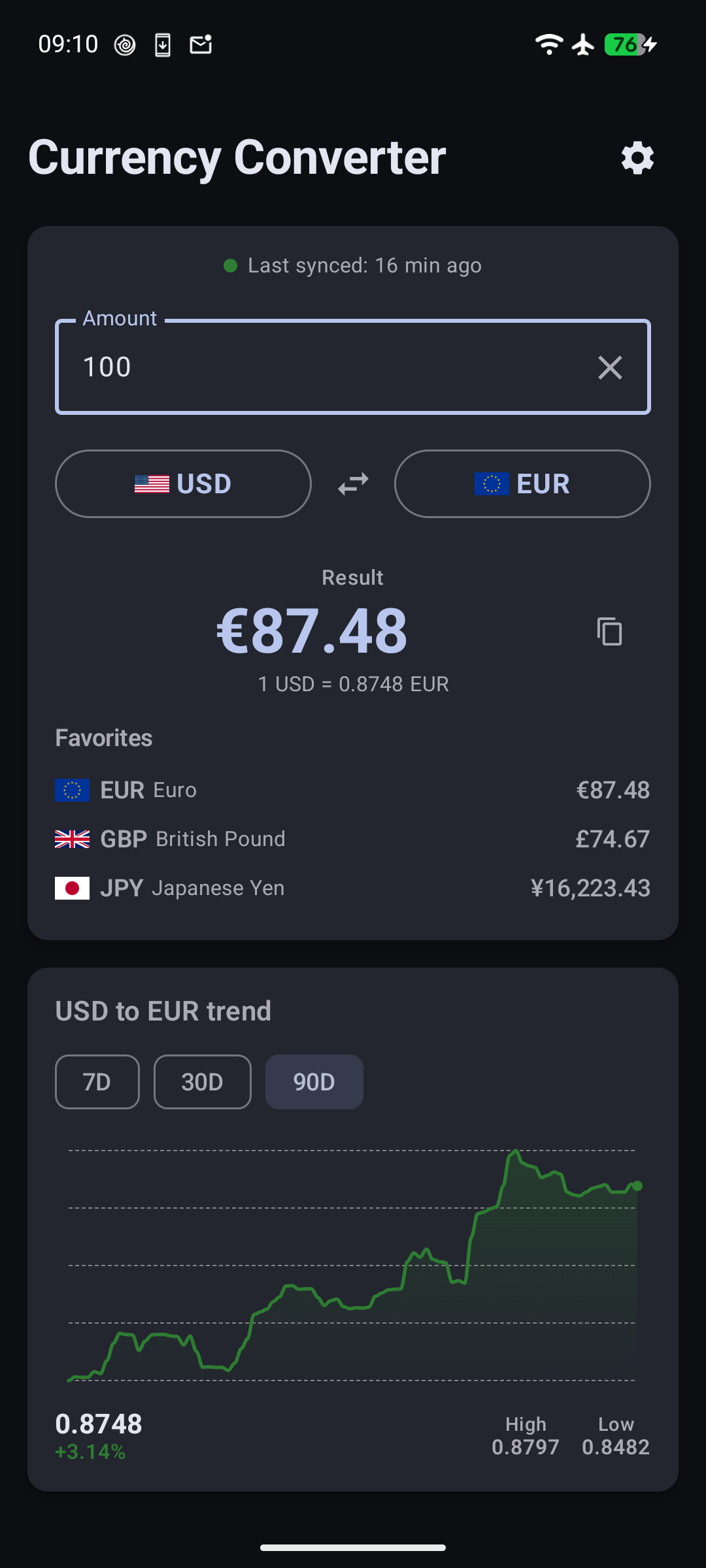
<p><img src="/assets/images/1.png" alt="Offline Currency Converter main screen" /></p>

<h2 id="favorites-and-multi-currency-view">Favorites and multi-currency view</h2>

<p>The most common request was obvious: “I use USD and EUR every day. Why do I have to scroll through 160 currencies every time?”</p>

<p>Now you can star any currency as a favorite. The Convert screen shows your favorites as chips below the input — tap one to convert directly to it, or see all your favorites at once with amounts filled in. No more scrolling.</p>

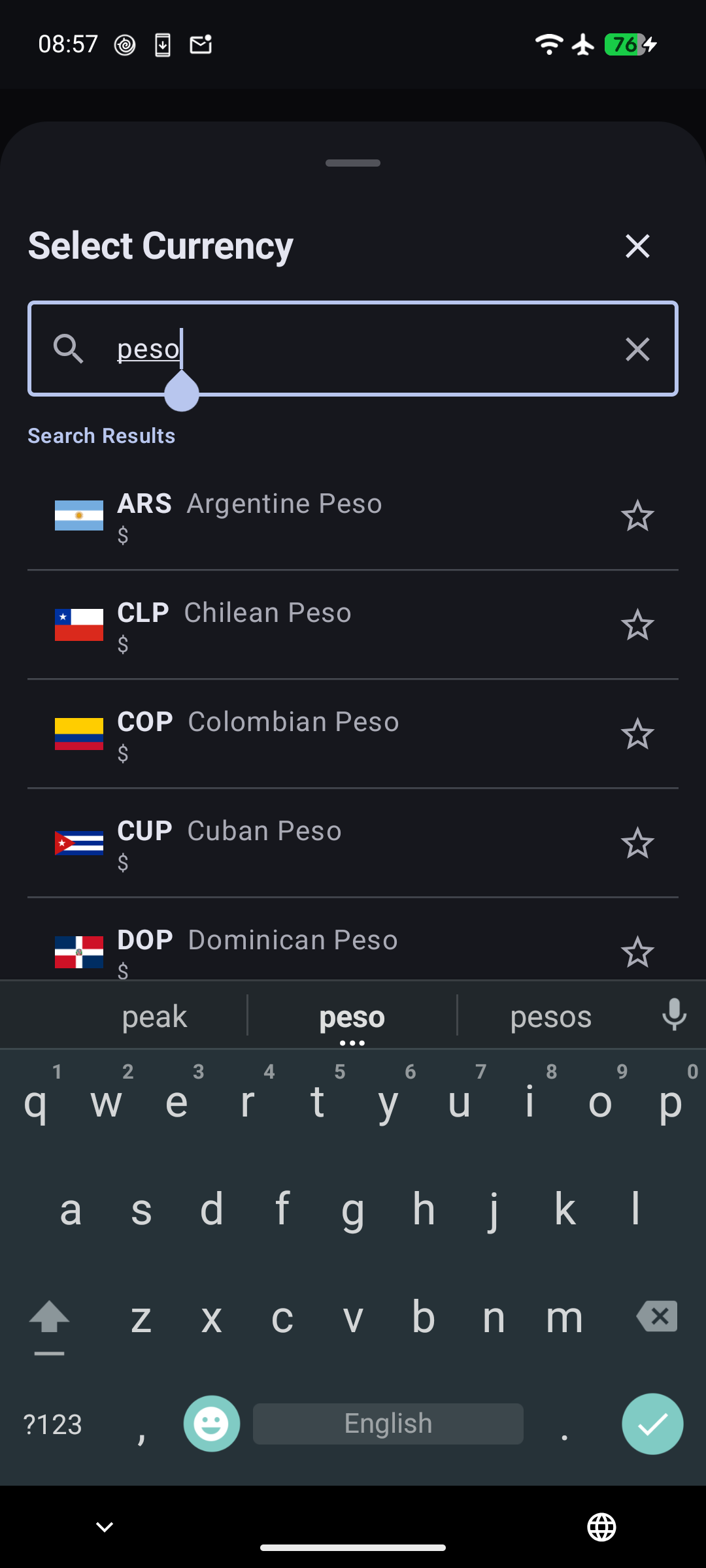
<p><img src="/assets/images/3.png" alt="Currency selection bottom sheet" /></p>

<p>New installs get a sensible default set: USD, EUR, GBP, JPY, and CNY. You can add or remove favorites in Settings. It’s a small change, but it makes the daily-use experience dramatically better.</p>

<h2 id="building-charts-with-pure-compose-canvas">Building charts with pure Compose Canvas</h2>

<p>I wanted rate trend charts, but I didn’t want to pull in a charting library. The app is 3 MB. A charting library would double that. And the charts I need are simple: a line, some shading, a few grid lines.</p>

<p>So I built it with Compose Canvas. The entire chart is about 200 lines of code.</p>

<p>The line uses cubic Bézier curves instead of straight segments — it looks smooth even when rates barely move day to day. Below the line, a vertical gradient fades from the trend color to transparent. The grid uses dashed lines so they don’t compete with the data. And the whole thing changes color based on whether the rate went up or down over the selected period.</p>

<p>The chart fetches 90 days of data from the Frankfurter API and stores it locally. You can filter to 7, 30, or 90 days with tab buttons — the filtering happens client-side, no extra network requests. The selected range persists across app restarts.</p>

<p>Long-press anywhere on the chart and a crosshair appears with the exact date and rate. It’s the kind of interaction that feels obvious once it’s there, but getting the touch detection right on a Canvas composable took some iteration. The gesture detection has to distinguish between a tap (scroll the page) and a long press (show the tooltip), which means tracking pointer events manually instead of relying on Compose’s built-in <code class="language-plaintext highlighter-rouge">combinedClickable</code>.</p>

<p>Below the chart, a summary row shows the current rate, the percentage change, and the high/low for the selected period. It gives you the numbers without making you interpret the curve.</p>

<h2 id="a-home-screen-widget">A home screen widget</h2>

<p>The widget was the hardest part — not because widgets are complex, but because Material You made it interesting.</p>

<p>On Android 12 and above, the widget uses your system’s dynamic color palette. Pick a blue theme, the widget card is blue. Pick green, it’s green. On older devices, it falls back to a teal that matches the app’s branding.</p>

<p>The widget shows a single line: “1 USD = 0.92 EUR”. That’s it. Minimal, glanceable, useful.</p>

<p>The tricky part is computing the rate. The app stores rates relative to EUR — so to show “1 USD = 148.50 JPY”, the widget has to look up USD→EUR and EUR→JPY, then divide. This cross-rate computation had to be fast (it runs on every widget update) and correct for all 160+ currency pairs.</p>

<p>The widget also updates automatically when you change currencies in the app or after a background sync. No manual refresh needed.</p>

<h2 id="smarter-sync-behavior">Smarter sync behavior</h2>

<p>The old approach synced exchange rates every time you opened the app. It worked, but it was wasteful — if you open the app 20 times a day, that’s 20 API calls to get the same rates.</p>

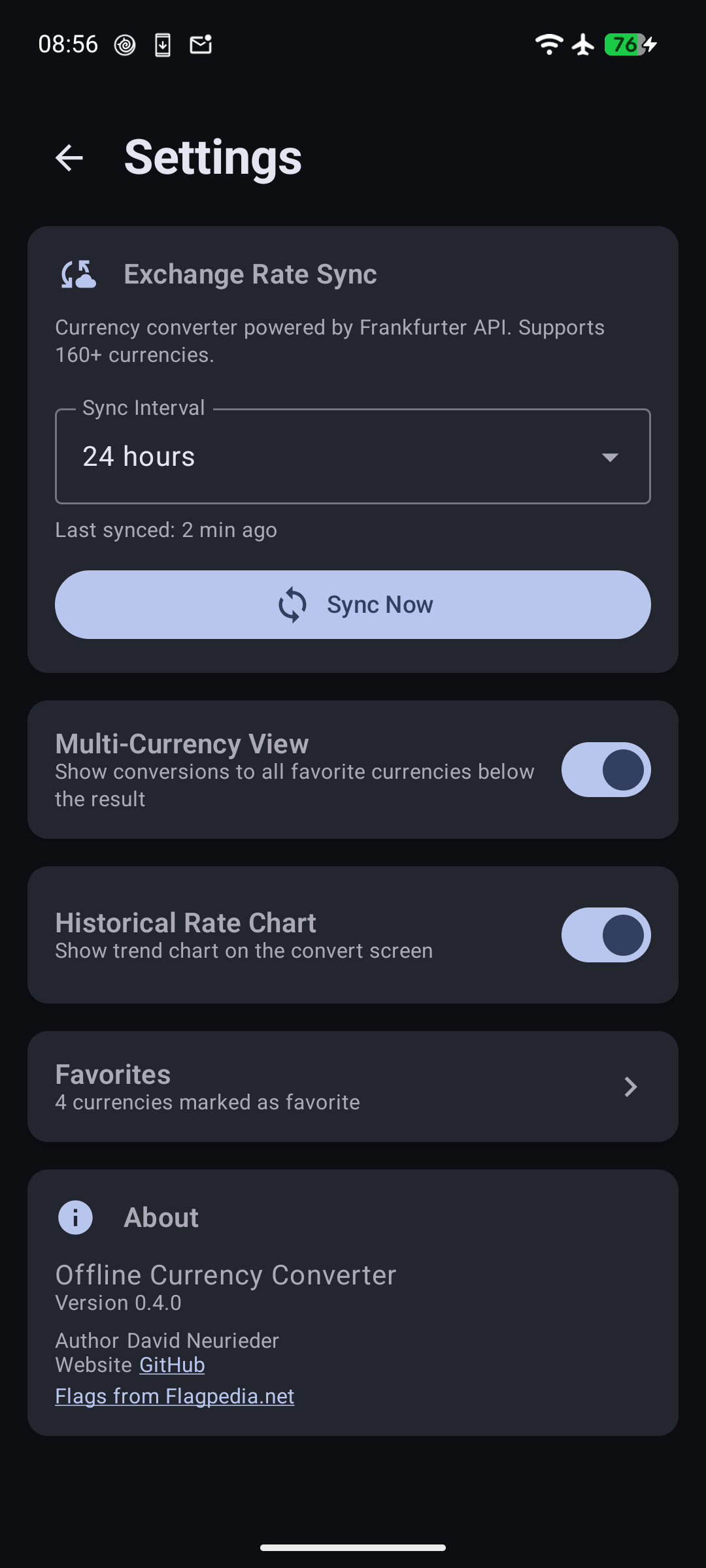
<p>The new approach syncs only on first install and when the app updates. Between versions, the rates you synced last time are good enough. If you want fresh rates, there’s a manual sync button. Pull-to-refresh always works too.</p>

<p>It’s a small change that saves battery and data, and it fits the app’s philosophy: work offline first, sync when it matters.</p>

<p><img src="/assets/images/2.png" alt="Settings screen" /></p>

<h2 id="everything-else">Everything else</h2>

<p>A few other changes worth mentioning:</p>

<ul>
  <li><strong>Amount persistence</strong> — type “100”, close the app, come back tomorrow. It still says 100. The default is 1 if you haven’t typed anything.</li>
  <li><strong>Copy button</strong> — tap to copy the converted amount to your clipboard. Useful when you’re sending a price to someone.</li>
  <li><strong>Sync status badge</strong> — a small colored indicator shows how fresh your rates are. Green for recent, yellow for aging, red for stale.</li>
  <li><strong>Settings navigation</strong> — Settings is now accessed via a gear icon in the header instead of a bottom nav bar. One less thing on screen.</li>
</ul>

<h2 id="try-it">Try it</h2>

<p>If you’ve been using the app, update and let me know what you think. If you haven’t tried it yet, it’s free, open source, and works without internet.</p>

<p>Source: <a href="https://github.com/DavidNeurieder/offline-currency-converter">github.com/DavidNeurieder/offline-currency-converter</a> (AGPL-3.0)</p>

<p><a href="https://f-droid.org/packages/com.offlinecurrencyconverter.app/"><img src="https://fdroid.gitlab.io/artwork/badge/get-it-on.png" alt="Get it on F-Droid" height="80" /></a></p>]]></content><author><name>David Neurieder</name></author><category term="android" /><category term="opensource" /><category term="privacy" /><category term="offline currency converter" /><category term="android" /><category term="currency-converter" /><category term="offline" /><category term="compose" /><category term="widget" /><category term="material-you" /><category term="offline currency converter" /><summary type="html"><![CDATA[Offline Currency Converter v0.4.0 adds favorites, rate trend charts with Compose Canvas, a Material You home screen widget, and smarter sync.]]></summary><media:thumbnail xmlns:media="http://search.yahoo.com/mrss/" url="https://davidneurieder.github.io/assets/images/posts/charts-widget.svg" /><media:content medium="image" url="https://davidneurieder.github.io/assets/images/posts/charts-widget.svg" xmlns:media="http://search.yahoo.com/mrss/" /></entry><entry><title type="html">I Built a Search Engine for My Notifications</title><link href="https://davidneurieder.github.io/2026/07/05/i-built-a-search-engine-for-my-notifications/" rel="alternate" type="text/html" title="I Built a Search Engine for My Notifications" /><published>2026-07-05T00:00:00+00:00</published><updated>2026-07-05T00:00:00+00:00</updated><id>https://davidneurieder.github.io/2026/07/05/i-built-a-search-engine-for-my-notifications</id><content type="html" xml:base="https://davidneurieder.github.io/2026/07/05/i-built-a-search-engine-for-my-notifications/"><![CDATA[<p>You know that feeling when you <em>know</em> you saw something in a notification — a confirmation code, a link, a message — but it’s gone. You scroll through notification history, find it capped at 50 entries, not searchable, and destined to be wiped on the next reboot.</p>

<p>I got tired of losing data my phone had already processed. So I built <a href="https://github.com/DavidNeurieder/ActivityTrace">Activity Trace</a> — an on-device search engine that captures notifications, screen content, and file text, then lets you search across everything. No internet, no AI, no cloud.</p>

<h2 id="why-notifications-are-the-worst">Why notifications are the worst</h2>

<p>Android’s notification history is a band-aid. It stores the last 50 notifications in a flat list with no search. If you dismiss something, it’s gone from the shade. If you reboot, the history is wiped. And it only covers notifications — what about things you saw on screen but didn’t get a notification for? Or text inside a downloaded PDF?</p>

<p>Activity Trace captures three sources:</p>

<ul>
  <li><strong>Notifications</strong> — via <code class="language-plaintext highlighter-rouge">NotificationListenerService</code>, every notification is captured as it arrives</li>
  <li><strong>Screen content</strong> — via <code class="language-plaintext highlighter-rouge">AccessibilityService</code>, text you see on screen (including in-app content, browser pages) is captured</li>
  <li><strong>Files</strong> — PDFs and text files in Downloads and Documents are indexed for search</li>
</ul>

<p>All three feed into a single encrypted database. You search once, get results from everywhere.</p>

<h2 id="search-that-works-without-ai">Search that works without AI</h2>

<p>The search understands natural language queries out of the box:</p>

<ul>
  <li><code class="language-plaintext highlighter-rouge">yesterday signal</code> — finds everything from Signal yesterday</li>
  <li><code class="language-plaintext highlighter-rouge">last week tracking</code> — finds tracking numbers from the past week</li>
  <li><code class="language-plaintext highlighter-rouge">in:whatsapp july 3</code> — narrows by app and date</li>
  <li><code class="language-plaintext highlighter-rouge">type:notification confirmation</code> — filters by source type</li>
</ul>

<p>Under the hood it’s SQLite <code class="language-plaintext highlighter-rouge">LIKE</code> substring matching with a query parser that extracts date ranges, app filters, and content type filters. No embeddings, no vector database, no cloud API. The first query returns in ~5ms.</p>

<p>I started with FTS5 (full-text search) but dropped it when I realized the <code class="language-plaintext highlighter-rouge">LIKE</code> approach was simpler, had zero maintenance, and performed identically at the scale of personal data (thousands, not millions, of records).</p>

<h2 id="encrypted-by-default">Encrypted by default</h2>

<p>The database is encrypted with SQLCipher (AES-256-CBC). The key lives in Android’s hardware-backed Keystore. If the device is locked, the database is unreadable.</p>

<p>The app has no internet permission in the manifest. Not “we promise not to use it” — the app literally cannot make network calls. There’s no telemetry, no crash reporting, no phoning home.</p>

<h2 id="export-backup-and-restore">Export, backup, and restore</h2>

<p>You own your data. The Settings screen offers:</p>

<ul>
  <li><strong>Export as CSV</strong> — RFC 4180 with UTF-8 BOM, Excel-compatible</li>
  <li><strong>Export as JSON</strong> — full structured export</li>
  <li><strong>Backup to SQLite</strong> — unencrypted copy of the database</li>
  <li><strong>Restore from backup</strong> — imports an SQLite backup, merging with existing data and skipping duplicates</li>
</ul>

<p>No cloud sync, no proprietary format, no vendor lock-in.</p>

<h2 id="retention-that-makes-sense">Retention that makes sense</h2>

<p>Notifications pile up. Activity Trace automatically cleans up records older than a configurable retention period (7, 30, or 90 days). The cleanup runs via Android WorkManager — it happens in the background, respects Doze mode, and doesn’t impact battery.</p>

<h2 id="the-tech-stack">The tech stack</h2>

<ul>
  <li><strong>Single-Activity Jetpack Compose</strong> with Material 3 and dynamic color</li>
  <li><strong>Room + SQLCipher</strong> for the encrypted database</li>
  <li><strong>WorkManager</strong> for scheduled retention cleanup and file indexing</li>
  <li><strong>NotificationListenerService</strong> + <strong>AccessibilityService</strong> for capture</li>
  <li><strong>Min SDK 26</strong>, targets Android 14 (API 34)</li>
  <li><strong>No Google Play Services</strong> — distributed exclusively through F-Droid</li>
</ul>

<p>The entire UI is about 700 lines of Compose. The capture layer is about 400 lines across three services. The database layer is about 300 lines including migrations.</p>

<h2 id="building-for-f-droid">Building for F-Droid</h2>

<p>Releasing on F-Droid meant:</p>

<ul>
  <li>All dependencies verified FOSS (SQLCipher BSD-3, PDFBox Apache-2.0)</li>
  <li>ProGuard minification with logging stripped in release builds</li>
  <li>R8 deterministic mode for reproducible builds</li>
  <li>No Google Play Services, no proprietary dependencies</li>
  <li>Full <code class="language-plaintext highlighter-rouge">fastlane</code> metadata with screenshots and changelogs</li>
</ul>

<p>The build process is automated with a Python script that runs lint, unit tests, instrumented tests (on an emulator), and both debug and release APK builds.</p>

<h2 id="whats-next">What’s next</h2>

<p>The app is feature-complete for v0.7.0. Future directions I’m considering:</p>

<ul>
  <li><strong>Widget</strong> — a homescreen search bar for instant access</li>
  <li><strong>Clipboard monitoring</strong> — capture copied text passively</li>
  <li><strong>Better file indexing</strong> — expand beyond Downloads/Documents to other directories via SAF</li>
  <li><strong>Search suggestions</strong> — autocomplete from historical queries</li>
</ul>

<h2 id="try-it">Try it</h2>

<p>If you’ve ever found yourself scrolling frantically through notifications looking for something you <em>know</em> you saw, give it a try.</p>

<p>Source: <a href="https://github.com/DavidNeurieder/ActivityTrace">github.com/DavidNeurieder/ActivityTrace</a> (GPL-3.0)</p>

<p><a href="https://f-droid.org/en/packages/com.activitytrace/"><img src="https://fdroid.gitlab.io/artwork/badge/get-it-on.png" alt="Get it on F-Droid" height="80" /></a></p>]]></content><author><name>David Neurieder</name></author><category term="android" /><category term="opensource" /><category term="privacy" /><category term="activity-trace" /><category term="android" /><category term="opensource" /><category term="privacy" /><category term="notifications" /><category term="search" /><category term="open-source" /><summary type="html"><![CDATA[Android's notification history stores 50 entries with no search. I built Activity Trace to capture notifications, screen content, and files into one encrypted database.]]></summary><media:thumbnail xmlns:media="http://search.yahoo.com/mrss/" url="https://davidneurieder.github.io/assets/images/posts/search-engine.svg" /><media:content medium="image" url="https://davidneurieder.github.io/assets/images/posts/search-engine.svg" xmlns:media="http://search.yahoo.com/mrss/" /></entry><entry><title type="html">Landed in Vietnam and Had No Idea What Anything Costs</title><link href="https://davidneurieder.github.io/2026/06/03/landed-in-vietnam-no-idea-what-anything-costs/" rel="alternate" type="text/html" title="Landed in Vietnam and Had No Idea What Anything Costs" /><published>2026-06-03T06:00:00+00:00</published><updated>2026-06-03T06:00:00+00:00</updated><id>https://davidneurieder.github.io/2026/06/03/landed-in-vietnam-no-idea-what-anything-costs</id><content type="html" xml:base="https://davidneurieder.github.io/2026/06/03/landed-in-vietnam-no-idea-what-anything-costs/"><![CDATA[<p>I landed in Saigon at 7AM. Jet-lagged. Disoriented. No mobile internet — I refuse to pay 10€ a day for roaming and the airport WiFi required a Vietnamese phone number to log in. Couldn’t check Google, couldn’t check Maps, couldn’t do anything.</p>

<p>I needed to get to my hostel and the taxi drivers outside were quoting prices I couldn’t even process. So I found the local bus stop, hopped on, and paid the conductor 20,000đ.</p>

<p><em>20,000 Vietnamese Dong.</em></p>

<p>At the time it felt like a lot. Look at all those zeros! 20,000! In my head I was thinking “that’s like 20 bucks or something.” I sat there on the bus feeling like I’d just spent a fortune on a single ride.</p>

<p>Spoiler: it was incredibly cheap. A 45-minute bus ride across town for less than a euro. I only realized how cheap it was a few days later when I took a similar trip and finally understood the scale of Vietnamese Dong.</p>

<p>That’s Vietnam for you. The currency is Dong (VND), and everything runs on numbers that look like phone bills. A bowl of phở? 50,000đ. A coffee? 20,000đ. A hotel room? 500,000đ. Coming from a country where a coffee costs 3€, I had no internal reference point. I was either overpaying or thinking I overpaid when I actually got a steal.</p>

<!--more-->

<h2 id="the-zero-problem">The Zero Problem</h2>

<p>Vietnamese Dong has a simple problem: too many zeros. 1 USD is about 25,000 VND. So every price is multiplied by 25,000 in your head. Quick, what’s 350,000đ in euros?</p>

<p><em>Stares blankly.</em></p>

<p>Your brain shuts down after the first calculation. You start guessing. “That looks like a lot of zeros, maybe it’s expensive?” Or worse: “That looks like nothing, let’s buy three.”</p>

<p>I’ve paid 50,000đ for a water bottle (should be 5,000đ) and celebrated finding a “cheap” 150,000đ meal (that’s actually normal).</p>

<h2 id="how-i-fixed-it">How I Fixed It</h2>

<p>I pulled out my phone, opened <a href="https://f-droid.org/packages/com.offlinecurrencyconverter.app/">Offline Currency Converter</a>, and typed in the number. No internet needed. Tap, done. 20,000đ → 0.80€. That’s a bus ride across the city. 50,000đ → 2€. That’s a bowl of phở.</p>

<p>The app doesn’t need a signal to work. It downloads exchange rates in the background when you’re on WiFi, stores them locally, and works everywhere. On the plane. In the subway. In a Hanoi back alley with zero bars.</p>

<p>After a week, I stopped needing it. Your brain eventually calibrates. “20k is a bus ride,” “50k is lunch,” “500k is dinner.” But that first week? It saved me from feeling ripped off when I actually got a bargain.</p>

<h2 id="the-app-that-lives-on-my-phone-now">The App That Lives on My Phone Now</h2>

<p>It’s called <a href="https://github.com/DavidNeurieder/offline-currency-converter">Offline Currency Converter</a> and it’s on F-Droid. 3 megabytes. 160+ currencies. Offline-first. No ads. No tracking. No internet permission.</p>

<p>It’s the first thing I install before any trip — right after “check how much a local bus actually costs.”</p>]]></content><author><name>David Neurieder</name></author><category term="travel" /><category term="android" /><category term="offline currency converter" /><category term="vietnam" /><category term="travel" /><category term="currency-converter" /><category term="offline" /><category term="open-source" /><category term="offline currency converter" /><summary type="html"><![CDATA[I landed in Saigon with no mobile internet and no idea what anything cost. Here's how I used my own app to survive on day one.]]></summary><media:thumbnail xmlns:media="http://search.yahoo.com/mrss/" url="https://davidneurieder.github.io/assets/images/posts/vietnam.svg" /><media:content medium="image" url="https://davidneurieder.github.io/assets/images/posts/vietnam.svg" xmlns:media="http://search.yahoo.com/mrss/" /></entry><entry><title type="html">I Published an App on F-Droid!</title><link href="https://davidneurieder.github.io/2026/06/02/publishing-on-fdroid/" rel="alternate" type="text/html" title="I Published an App on F-Droid!" /><published>2026-06-02T00:00:00+00:00</published><updated>2026-06-02T00:00:00+00:00</updated><id>https://davidneurieder.github.io/2026/06/02/publishing-on-fdroid</id><content type="html" xml:base="https://davidneurieder.github.io/2026/06/02/publishing-on-fdroid/"><![CDATA[<p>🎉 It’s live! My app — <strong>Offline Currency Converter</strong> — is now on</p>

<p><a href="https://f-droid.org/packages/com.offlinecurrencyconverter.app/"><img src="https://fdroid.gitlab.io/artwork/badge/get-it-on.png" alt="Get it on F-Droid" height="80" /></a></p>

<p>I’ve been building this for a while, and seeing it on F-Droid with that green badge feels amazing. It’s a privacy-first currency converter that works entirely offline. No ads, no internet permission, no tracking — exactly the kind of app F-Droid was made for.</p>

<p>Getting onto F-Droid was a fun ride with a few bumps along the way. Here’s the story.</p>

<h2 id="how-f-droid-works">How F-Droid Works</h2>

<p>F-Droid is brilliant: they build every app from source themselves. You just submit metadata and a git tag. Their servers clone your repo, build the APK, and — if it matches your local build byte-for-byte — it’s published. No APK uploads, no shady binaries.</p>

<p>The steps:</p>

<ol>
  <li><strong>Add metadata</strong> — A <code class="language-plaintext highlighter-rouge">fastlane/metadata/android/</code> directory with descriptions, screenshots, feature graphic, and changelogs.</li>
  <li><strong>Create a build recipe</strong> — Submit a PR to the <a href="https://gitlab.com/fdroid/fdroiddata"><code class="language-plaintext highlighter-rouge">fdroiddata</code></a> repo with a YAML entry pointing to your repo.</li>
  <li><strong>Get reviewed</strong> — The F-Droid maintainers check everything and merge.</li>
  <li><strong>Build farm does its magic</strong> — The app gets built and published.</li>
</ol>

<p>From PR merge to appearing in the F-Droid client: about <strong>2 days</strong>. That’s incredible.</p>

<h2 id="oops-my-metadata-was-invisible">Oops: My Metadata Was Invisible</h2>

<p>If you check version 0.1.0 on F-Droid, you’ll see the app icon, feature graphic, and screenshots are all missing. The app works fine, but the store page looks embarrassingly bare.</p>

<p>Why? I put my <code class="language-plaintext highlighter-rouge">fastlane/</code> directory inside <strong><code class="language-plaintext highlighter-rouge">app/fastlane/</code></strong> instead of at the project root. F-Droid’s build system only looks for <code class="language-plaintext highlighter-rouge">fastlane/metadata/android/</code> at the root of the repo. My metadata was invisible!</p>

<p>Easy fix: move <code class="language-plaintext highlighter-rouge">fastlane/</code> to the root. Next build, everything should show up.</p>

<h2 id="the-reproducible-build-headache">The Reproducible Build Headache</h2>

<p>F-Droid requires the APK they build to be <strong>byte-for-byte identical</strong> to yours. It’s a great security practice — if anyone tampered with your source, the hashes wouldn’t match.</p>

<p>My first build attempt failed. Their APK was different from mine. After digging in, the culprit was <strong><code class="language-plaintext highlighter-rouge">classes2.dex</code></strong>.</p>

<p>The cause? <strong>Baseline profiles</strong>. The Android Gradle Plugin includes baseline profile files (<code class="language-plaintext highlighter-rouge">baseline.prof</code>, <code class="language-plaintext highlighter-rouge">baseline.profm</code>) under <code class="language-plaintext highlighter-rouge">/assets/dexopt/</code>. These embed non-deterministic metadata like timestamps, which made <code class="language-plaintext highlighter-rouge">classes2.dex</code> differ between builds.</p>

<p>The fix was one line:</p>

<div class="language-kotlin highlighter-rouge"><div class="highlight"><pre class="highlight"><code><span class="c1">// app/build.gradle.kts</span>
<span class="nf">packaging</span> <span class="p">{</span>
    <span class="nf">resources</span> <span class="p">{</span>
        <span class="n">excludes</span> <span class="p">+=</span> <span class="s">"/assets/dexopt/*"</span>
    <span class="p">}</span>
<span class="p">}</span>
</code></pre></div></div>

<p>One exclusion rule and the problem vanished. What a relief!</p>

<h2 id="more-tips-for-a-deterministic-build">More Tips for a Deterministic Build</h2>

<p>Here’s the full checklist I ended up with:</p>

<ul>
  <li><strong>Disable R8/ProGuard</strong> — <code class="language-plaintext highlighter-rouge">isMinifyEnabled = false</code>. R8 can produce non-deterministic output.</li>
  <li><strong>Strip VCS info</strong> — <code class="language-plaintext highlighter-rouge">vcsInfo.include = false</code>. Build metadata differs between environments.</li>
  <li><strong>Disable dependency info</strong> — <code class="language-plaintext highlighter-rouge">dependenciesInfo.includeInApk = false</code>.</li>
  <li><strong>Disable build cache</strong> — <code class="language-plaintext highlighter-rouge">org.gradle.caching = false</code> in <code class="language-plaintext highlighter-rouge">gradle.properties</code>.</li>
  <li><strong>Add <code class="language-plaintext highlighter-rouge">.gitattributes</code></strong> — <code class="language-plaintext highlighter-rouge">* text=auto eol=lf</code> with <code class="language-plaintext highlighter-rouge">*.png binary</code>. Line endings will break reproducibility.</li>
  <li><strong>Use the Gradle wrapper</strong> — Pin the exact Gradle version.</li>
  <li><strong>Use apksigner 34</strong> — apksigner 35+ produces non-deterministic signatures. Compare unsigned APKs to be safe.</li>
</ul>

<p>The moment of truth — build twice and compare:</p>

<div class="language-bash highlighter-rouge"><div class="highlight"><pre class="highlight"><code>./gradlew clean assembleRelease
<span class="nb">cp </span>app/build/outputs/apk/release/app-release-unsigned.apk /tmp/apk-1.apk
./gradlew clean assembleRelease
<span class="nb">cp </span>app/build/outputs/apk/release/app-release-unsigned.apk /tmp/apk-2.apk
<span class="nb">sha256sum</span> /tmp/apk-<span class="k">*</span>.apk
</code></pre></div></div>

<p>When the hashes match… <strong>chef’s kiss</strong>.</p>

<h2 id="its-live">It’s Live!</h2>

<p>After fixing the metadata location and the baseline profile issue, the F-Droid maintainers merged my recipe. A couple of days later, the app appeared in the F-Droid client with full metadata, screenshots, and the green badge on my README.</p>

<p><strong>That feeling when you search your own app and it shows up? Unreal.</strong></p>

<p><a href="https://f-droid.org/packages/com.offlinecurrencyconverter.app/"><strong>Get it on F-Droid</strong></a></p>

<p>Source code on <a href="https://github.com/anomalyco/offline-currency-converter">GitHub</a> under AGPL-3.0.</p>

<p>If you’re thinking of publishing your own app on F-Droid — <strong>do it</strong>. The process is rewarding, the community is amazing, and nothing beats seeing your app on that green badge. Go for it!</p>]]></content><author><name>David Neurieder</name></author><category term="android" /><category term="fdroid" /><category term="reproducible-builds" /><category term="offline currency converter" /><category term="android" /><category term="fdroid" /><category term="reproducible-builds" /><category term="open-source" /><category term="gpl" /><category term="offline currency converter" /><summary type="html"><![CDATA[My app Offline Currency Converter is now on F-Droid. Here's how I got through reproducible builds, metadata mistakes, and the build farm.]]></summary><media:thumbnail xmlns:media="http://search.yahoo.com/mrss/" url="https://davidneurieder.github.io/assets/images/posts/fdroid.svg" /><media:content medium="image" url="https://davidneurieder.github.io/assets/images/posts/fdroid.svg" xmlns:media="http://search.yahoo.com/mrss/" /></entry><entry><title type="html">Why I Built a Currency Converter That Works Without Internet</title><link href="https://davidneurieder.github.io/2026/05/27/offline-first-architecture-lessons-from-building-a-currency-converter/" rel="alternate" type="text/html" title="Why I Built a Currency Converter That Works Without Internet" /><published>2026-05-27T08:00:00+00:00</published><updated>2026-05-27T08:00:00+00:00</updated><id>https://davidneurieder.github.io/2026/05/27/offline-first-architecture-lessons-from-building-a-currency-converter</id><content type="html" xml:base="https://davidneurieder.github.io/2026/05/27/offline-first-architecture-lessons-from-building-a-currency-converter/"><![CDATA[<p>I travel a lot. And every trip, the same thing happens: I land somewhere, turn off airplane mode, and… nothing. No signal. No roaming. No data.</p>

<p>I open a currency converter app to figure out how much that taxi should cost, and it gives me a spinning circle. The app needs the internet to work. I’m standing in an airport with no roaming — the one time I actually need a currency converter — and it’s useless.</p>

<p>This happens everywhere: on planes, on trains, in tunnels, in parking garages. Even in hotels with “free WiFi” that requires a browser login that your currency converter can’t use.</p>

<h2 id="the-real-use-cases">The real use cases</h2>

<p>I built <a href="https://github.com/DavidNeurieder/offline-currency-converter">Offline Currency Converter</a> for specific situations I keep finding myself in:</p>

<p><strong>You just landed.</strong> You’ve arrived in a new country, you’re at baggage claim, and you need to know what a fair price is for a ride into the city. You have no SIM yet, the airport WiFi requires a SMS verification you can’t receive, and every converter app is showing a loading spinner. This app opens and works immediately — it already synced rates the last time you had WiFi at home.</p>

<p><strong>You’re on a plane.</strong> You’re looking at the duty-free magazine and want to know if that bottle of whisky is actually a deal. No WiFi on this flight (or it costs $30). Open the app, tap two currencies, get your answer. No signal required.</p>

<p><strong>You’re in a subway.</strong> You’re commuting underground and need to check a price before you buy. No signal for the next 20 minutes. The app doesn’t care.</p>

<p><strong>You’re traveling somewhere remote.</strong> Hiking, camping, road tripping through areas with spotty coverage. You synced rates before you left. They’re still on your phone.</p>

<p><strong>You’re on a budget while traveling.</strong> You’re checking prices and want to know exactly what you’re spending in your home currency. You open and close the app dozens of times a day — it should be instant, not waiting for a network request every single time.</p>

<h2 id="how-it-works-for-the-user">How it works for the user</h2>

<p>Open the app, and you see two currency fields and a number pad. Pick your currencies, type an amount, and you get the conversion instantly. That’s it.</p>

<p>The app remembers your recent currencies so you don’t have to search for them again. It keeps your last 10 conversions visible as a history list. If rates haven’t been updated recently, you’ll see a small banner at the bottom: “Rates may be outdated.” The conversion still shows — just with a heads-up.</p>

<p>There’s no account to create. No sign-up. No ads. No permissions beyond internet access. It’s a tool, not a platform.</p>

<h2 id="whats-under-the-hood-briefly">What’s under the hood (briefly)</h2>

<p>The app syncs exchange rates from the free Frankfurter API whenever you’re on WiFi or mobile data — automatically, in the background. You can set the sync interval from every 6 hours to once a week. Between syncs, all conversions use the cached rates stored locally on your phone.</p>

<p>If you’ve never had internet since installing (happens more than you’d think — people install apps before trips), the app has hardcoded fallback rates for all 160+ currencies. They’re not as fresh as live rates, but they’re accurate enough to know if that $50 tour is reasonable.</p>

<p>The whole app is 3 MB. Smaller than a single photo. And it supports 14 languages natively — including Arabic right-to-left layout — so if German or Japanese or Hindi is your preferred language, the app speaks it out of the box, no download required.</p>

<h2 id="where-to-get-it">Where to get it</h2>

<p>The app will be published on F-Droid — free, open source, no tracking. You can also grab the APK directly or build from source on GitHub.</p>

<p>Next time you land somewhere new and your phone has no signal, you’ll have one less thing to worry about.</p>]]></content><author><name>David Neurieder</name></author><category term="android" /><category term="travel" /><category term="offline currency converter" /><category term="android" /><category term="travel" /><category term="offline" /><category term="currency-converter" /><category term="real-world" /><category term="offline currency converter" /><summary type="html"><![CDATA[I travel a lot and every trip the same thing happens: I need a currency converter and it needs internet. So I built one that works offline.]]></summary><media:thumbnail xmlns:media="http://search.yahoo.com/mrss/" url="https://davidneurieder.github.io/assets/images/posts/currency-converter.svg" /><media:content medium="image" url="https://davidneurieder.github.io/assets/images/posts/currency-converter.svg" xmlns:media="http://search.yahoo.com/mrss/" /></entry></feed>